Web and product

A slow site costs you visits, rankings and sales.

We measure, prioritise and optimise with judgement: Core Web Vitals, images, fonts, JavaScript, database and hosting. We measure first to know what to fix, rather than optimising blind.

Core Web Vitals · what each one measures
LCP < 2.5 s
Largest Contentful Paint
How long the main content of the page takes to appear. Usually a large image or the headline.
INP < 200 ms
Interaction to Next Paint
How long the page takes to respond when someone taps or clicks. It measures perceived smoothness.
CLS < 0.1
Cumulative Layout Shift
How much content moves while loading. This is what makes people press the wrong button.
They are measured with real-user data, not only in lab tests.
At a glance

TouringXX’s web performance and optimisation service measures and improves the speed of sites and stores: Core Web Vitals, resource loading, database and server configuration. It is built for companies whose site works but feels slow, especially on mobile, and loses visits or sales because of it. The expected outcome is a measurable improvement with before-and-after data, not a subjective impression.

Measure before touching anything

Most slow sites are not slow for a single reason. It is usually an accumulation: unoptimised images, half a dozen third-party scripts, fonts that block rendering, heavy database queries and a badly configured cache.

Optimising without measuring leads to working on what doesn’t matter. That is why the starting point is a measurement with real-user data, showing where the time is lost and which changes recover it. Then it is prioritised by impact and effort.

Core Web Vitals Images Fonts JavaScript Cache and CDN Database
Who it’s for

Sites that work, but take too long.

Online stores with high mobile traffic. Every second of waiting on mobile turns into abandoned carts.
Content-heavy corporate sites. Large sites and portals that gained weight over the years.
Projects investing in advertising. Paying for traffic that is lost while loading is wasted budget.
Sites dropping in rankings with no clear cause. Performance is one of the factors search engines consider.
When optimising is not the answer. If the site drags years of accumulated plugins, legacy code and a structure nobody maintains, optimising is patching. The audit says so plainly and raises whether a redesign makes more sense than continuing to invest in the current site.
Common situations

Signs that performance is costing money

Google Search Console reports URLs with poor Core Web Vitals.
The site looks fine on the office desktop but crawls on a customer’s phone.
Images settle while the page loads and the content jumps.
Response time got worse after installing plugins or marketing scripts.
The store noticeably lags moving from product to cart.
Hosting saturates during campaigns or traffic peaks.
Results

What changes when the site loads fast

The concrete improvement depends on the starting point: a very slow site has plenty of margin, an already decent one has less. What we commit to is the honest measurement of before and after.

Faster, measurable loading

A verifiable improvement in Core Web Vitals with real-user data, not just lab tests.

Less mobile abandonment

Most traffic arrives from the phone, where every second weighs more.

Better perceived experience

Content appears sooner and doesn’t move while loading.

A technical base that helps SEO

Performance is a factor search engines take into account when ranking.

Right-sized infrastructure

Cache, CDN and server configuration aligned with the site’s real traffic.

Criteria for the future

Documentation of what to add and what to avoid so you don’t end up back at the start.

Scope

What we analyse

Not everything applies to every case. The audit states which fronts have real margin on your site and in what order to tackle them.

Front 01

Site resources

· Image format and size · Lazy loading · Fonts and subsets · Critical CSS · Unused JavaScript
Front 02

Infrastructure

· Hosting and resources · Page and object cache · CDN · Compression · PHP and server version
Front 03

Database and CMS

· Slow queries · Residual tables and data · High-cost plugins · Overloaded themes · Autoload and transients
Front 04

Third parties and measurement

· Analytics scripts and pixels · External widgets · Conditional loading · Continuous monitoring · Field data
How we work this service

Baseline, prioritise, optimise, measure again.

The baseline measurement is not a formality: it is the reference that later proves what improved and by how much. Without that starting point, any later claim would be an opinion.

01 Baseline measurement

The current state is recorded with field and lab data, on desktop and mobile.

Recibes: report with the baseline
02 Prioritisation

Problems are ordered by impact and effort, separating what we can fix from what depends on third parties.

Recibes: prioritised work plan
03 Optimisation

Agreed changes are applied in a test environment before moving to production.

Recibes: changes implemented and verified
04 Post-measurement

It is measured again with the same method to compare and document the real result.

Recibes: comparative report and recommendations
Performance degrades over time. Every new plugin, every marketing script and every unoptimised image adds weight. A one-off optimisation improves the present; sustaining the result requires periodically reviewing what was added and at what cost.
Real measurement

Performance is proved with numbers, not adjectives.

A before-and-after comparison on a real project, with the measurement conditions stated: what was measured, when and with which tool.
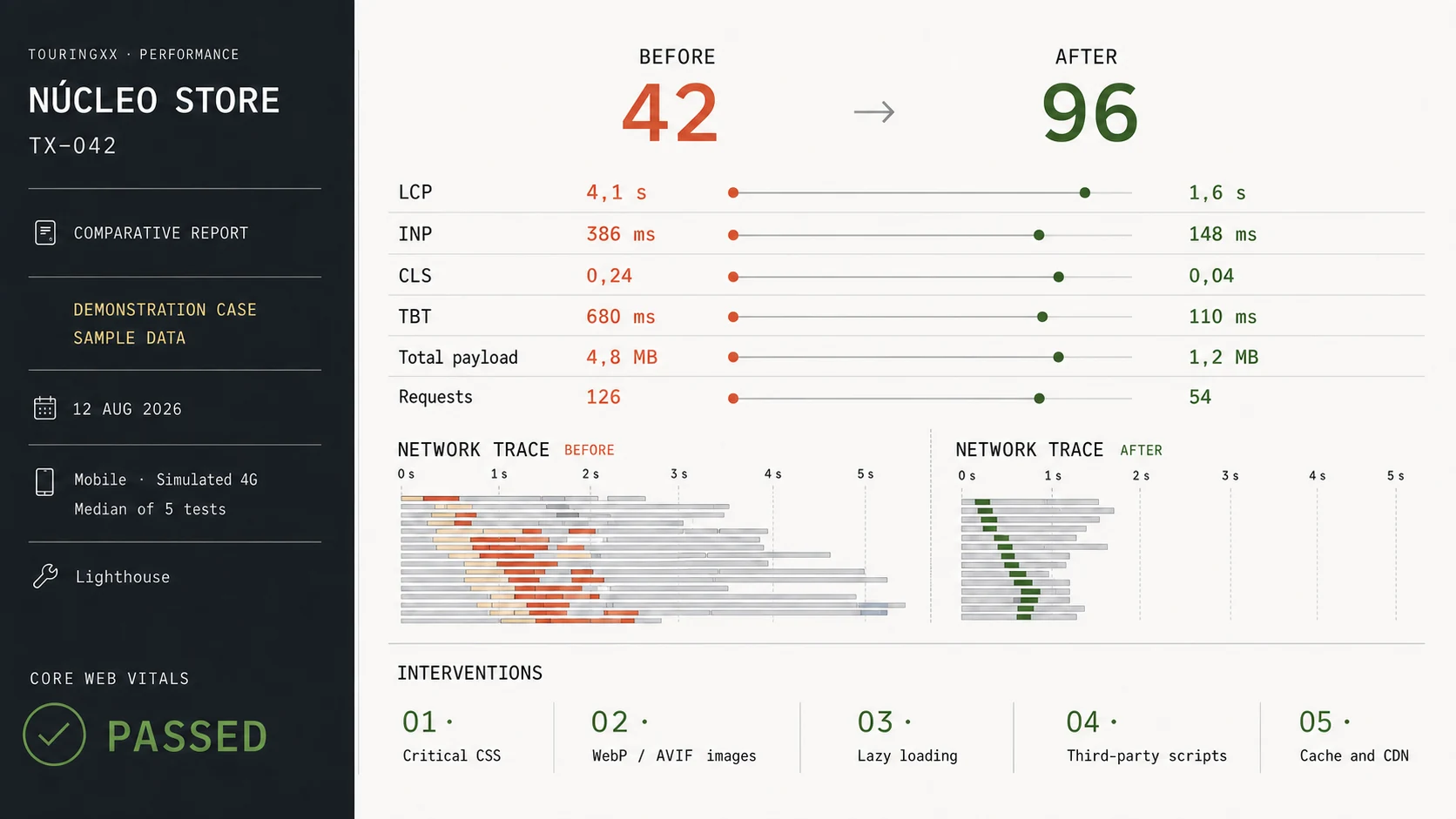
Visual pending 16:9
Performance · before / after — Core Web Vitals before and after, with date and measurement conditions
Publishable only with real data from a project, with the client’s permission; if no case is available, the section is not published.
Service: Performance and optimisation

“Excellent work! Much faster than I expected, and the site loading speed ended up far better than I would have achieved on my own.”

jg
juncogrowth · Client review
Original wording · source: Envato Studio
What can be claimed

We promise measurement, not a magic number.

We don’t say “your site will load in one second” before seeing it. There are limits imposed by the hosting, the CMS, the third-party scripts the company needs and the site’s own architecture. The audit states what real margin exists and what it would take to go further.

View all testimonials
Frequently asked questions

Common questions about speed

The audit answers these questions with your site’s data, not with industry averages.

How much will my site improve?+
That can’t be answered before measuring. It depends on the starting point, the hosting, the CMS and how many third-party scripts are essential. The audit gives an estimate of the real margin with your site’s data instead of a generic promise.
Is scoring 100 in PageSpeed Insights the goal?+
It is not the goal. That score is a lab test that can rise without the user experience improving. What matters is field data: how the site loads for the people who really visit it.
Will you remove the plugins we need?+
Nothing is removed without agreement. What we do is show the cost of each one so the decision is informed: sometimes a plugin justifies its weight, sometimes there is a lighter alternative.
Do we have to change hosting?+
Only if hosting is the real bottleneck. Often the problem is in the site, not the server. When the change is justified, we explain why and what improvement to expect.
Does optimisation affect the design?+
The goal is for it not to show. Some decisions — very expensive animations, huge images, multiple fonts — may require adjustments, and in those cases options are raised before applying the change.
How long does the improvement last?+
Performance degrades with use: every plugin, every new script and every unoptimised image adds weight. That is why criteria are documented, and periodic review within the maintenance service is recommended to sustain the result.
Can any site be optimised?+
There is almost always margin, but it isn’t always worth it. If the site drags legacy code and an architecture that is hard to maintain, the audit says so and raises whether a redesign is more reasonable than continuing to optimise.

Services that usually go with it

Speed is won once and kept with maintenance.

To go deeper

Why speed affects ranking and conversion.

Let’s start by measuring how your site loads today.

The performance audit delivers the current state, the list of problems ordered by impact and an estimate of what can improve. With that you decide whether optimising is worth it or another route is better.