Intelligence and automation

Let your data move between the tools you already use.

We connect CRM, ERP, invoicing, inventory and e-commerce so repetitive tasks stop being done by hand. Less copying and pasting, fewer transcription errors, and processes that move forward without reminders.

Today · manual
The order arrives by email.↓ wait
Someone transcribes it into the ERP.↓ wait
The record is updated in the CRM.↓ wait
The invoice is generated by hand.↓ wait
The customer is notified when someone remembers.
After · automated
The order arriving triggers the flow.
ERP, CRM and inventory update at once.
Approval by the owner.person decides
Invoice issued and notification sent automatically.
Automation doesn’t remove human judgement: it reserves it for where a decision is needed.
At a glance

TouringXX’s process automation and integration connects the tools a company already uses so information flows without manual intervention. It is built for teams spending hours copying data between systems, chasing approvals or sending documents repeatedly. The expected outcome is less manual work, fewer transcription errors and processes that advance without relying on reminders.

What it is, concretely

Automating doesn’t mean replacing systems. It means that when something happens — an order arrives, a quote is approved, a status changes — the consequences run on their own: the record is created, the document is generated, the notification goes out and the data stays synchronised everywhere.

The work starts by mapping the real process, not the one in the manual. Manual points, waiting times and data re-entry are identified; from there we decide what is worth automating and what should still go through a person.

Workflows APIs Webhooks Data synchronisation Business rules AI-assisted automation
Who it’s for

Teams that grew faster than their processes.

Companies with several systems that don’t talk. The same data is typed two or three times into different tools.
Administration and operations areas. Invoicing, order tracking, approvals and recurring reports.
Sales teams with manual follow-up. Reminders, sending proposals and updating statuses in the CRM.
Stores with growing volume. Every order involves manual steps that no longer scale with sales.
When it is better to wait. If the process changes every week or nobody agrees on how it should work, automating it entrenches the disorder. First the process is defined; then it is automated.
Common situations

Signs a process is asking to be automated

The same data is entered into more than one system.
Some tasks only move forward when somebody remembers them.
Spreadsheets are used as a bridge between two tools.
Approvals are requested by email and get lost in the inbox.
Errors appear when transcribing figures or references.
Month-end close depends on gathering information by hand.
Results

What changes when the process stops being manual

Real savings depend on the volume and on how many systems can be integrated. These are the changes the work aims for, measured on the specific process being automated.

Fewer hours on repetitive tasks

Time spent copying and transcribing is freed up for work that needs judgement.

Fewer transcription errors

Data is entered once and propagates; there stop being different versions of the same record.

Processes that don’t stall

Approvals and follow-ups advance without depending on personal reminders.

Consistent information

CRM, ERP and inventory reflect the same state instead of contradicting each other.

Visibility of the flow

There is a record of what ran, when and with what result.

A foundation for AI

With data tidy and connected, a query layer on top of it becomes viable.

Scope

What gets automated and what gets connected

Processes
Internal approvals Sales follow-ups Document issuing Email sending Record creation and updates Data reconciliation Recurring reports Alerts and reminders
Systems and integration methods
CRM ERP Invoicing Inventory E-commerce APIs Webhooks Databases
Use cases

Automations people ask for most

Sales From approved quote to issued invoice
When the client approves, the record is created, the document is issued and the relevant area is notified with no manual steps.
Orders Sync between store, inventory and ERP
Each order reduces stock, creates the accounting record and updates the status the customer sees.
Approvals Authorisation circuit with traceability
The request reaches whoever must approve, the decision is logged and the process only continues with authorisation.
Documents Automatic document generation
Contracts, orders and receipts are filled with system data and filed where they belong.
Follow-up Reminders that don’t depend on a person
If a task passes its due date, the alert goes to the owner automatically.
Data Reconciliation between two sources
Differences between systems are detected and reported before they become a closing problem.
How we work this service

We map before automating, and measure afterwards.

Automating a poorly understood process multiplies the problem. That is why the first stage is always observing how it works today, with the people who run it.

01 Mapping

The real process is observed with the people who run it, recording manual points and waiting times.

Recibes: current process map and baseline
02 Prioritisation

Effort and impact are estimated for each point, deciding what to automate first and what stays manual.

Recibes: scope proposal by priority
03 Implementation

Integrations and flows are built, with error handling and alerts when something fails.

Recibes: working flow and technical documentation
04 Measurement and tuning

Results are compared with the baseline, edge cases are fixed and ongoing monitoring is defined.

Recibes: comparison and maintenance plan
Monitoring and maintenance from the outset. An automation breaks when an API changes, a credential expires or somebody modifies a field. From the start we define how those failures are detected, who receives the alert and how the flow is documented so it doesn’t depend on one person.
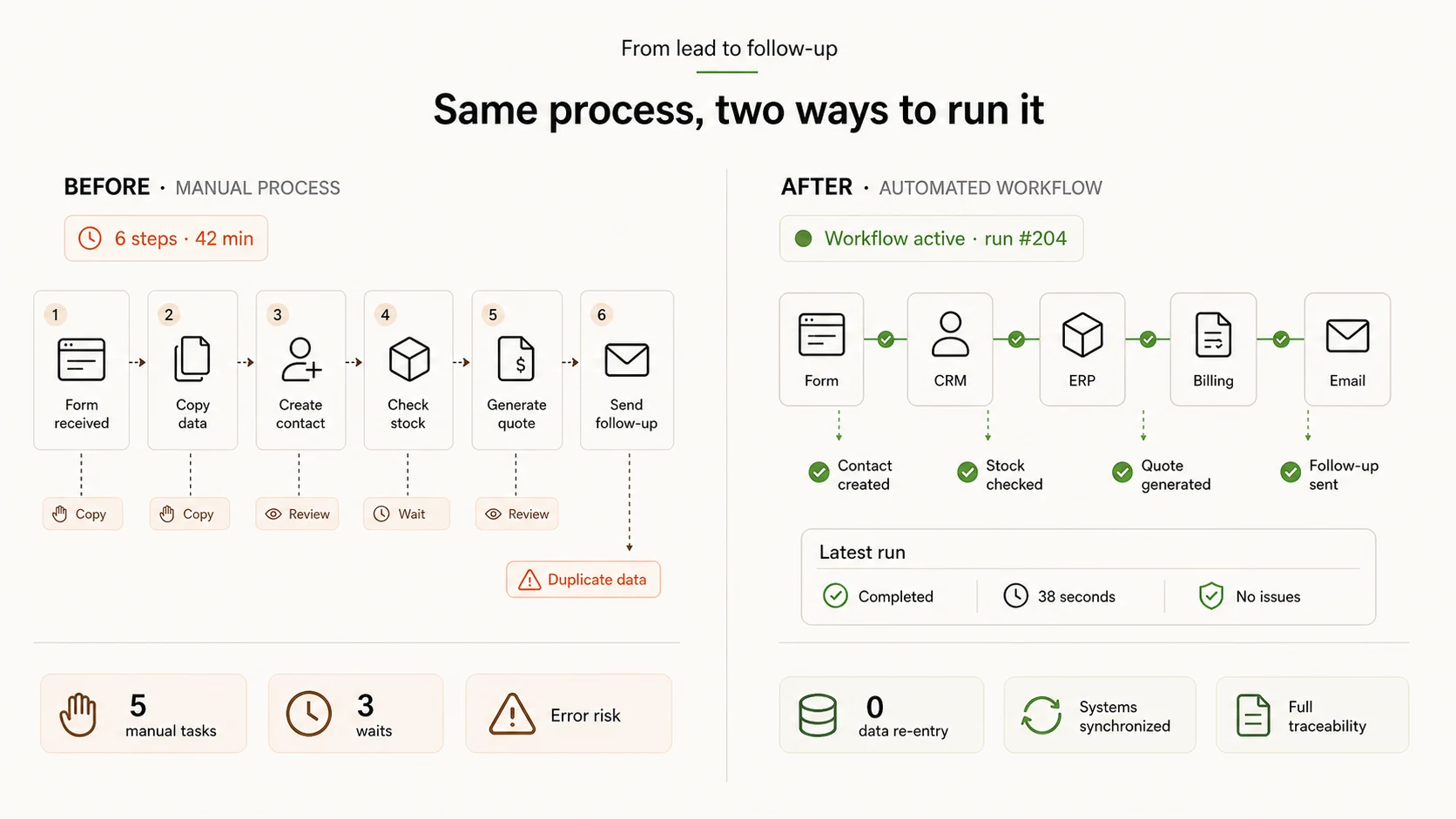
The flow, before and after

What gets automated is best seen by comparison.

A manual process and the same process automated, side by side: the same steps, with no data re-entry and no waiting between systems.
Visual pending 16:9
Automation Workflow · before / after — manual flow with steps and data re-entry against the automated flow with synchronised systems
The comparison is the argument: this is not about adding technology, but about removing steps a person does by hand today.
Service: Automation

“They automated approvals and follow-ups. The team stopped copying data between spreadsheets and systems, and things move forward without anyone having to remember them.”

▲ Fewer manual tasks per week
SI
Sebastián Ibáñez · COO
LogiSur · Argentina
What can be claimed

Savings are measured on the specific process, not in the abstract.

Before automating, we record how long the current process takes and how often it happens. That baseline is what later allows us to say, with the company’s own data, what changed. Without it, any percentage would be invented.

View all testimonials
Frequently asked questions

Common questions before automating

If your case isn’t here, the process analysis is where we answer it with your operation in front of us.

Do we have to change the systems we already use?+
No. The starting point is always working with the tools in use. If one offers no possible integration, alternatives are assessed during mapping — but replacing all the company software is not the plan.
What happens if an automation fails?+
Every flow is built with error handling: if a step doesn’t complete, it is logged and the responsible person is alerted. The operation doesn’t stop silently, which is the real risk of automating without control.
How many processes should we automate at first?+
One or two, chosen by frequency and by time consumed. Automating too much at once makes it hard to tell what works and what needs tuning.
Do we need technical staff on our side?+
You need someone who knows the process and can validate decisions, not necessarily a technical profile. System access usually requires whoever administers each tool.
Does automation replace jobs?+
The approach is to remove repetitive tasks, not people. Typically the team recovers time for work that requires judgement, customer attention or analysis.
What maintenance does it need afterwards?+
Integrations depend on external services that change: APIs get updated, credentials expire. Who monitors and how those cases are handled is defined from the start.
Can it be automated with artificial intelligence?+
Yes, when the step involves interpreting text or classifying loosely structured information. In processes with clear rules, traditional automation is more predictable and easier to audit.

Services that usually go with it

Automation is usually the step before or after another piece of work.

To go deeper

How processes are chosen and what to expect from each.

Also available in AI Hub

Automations the team can build themselves

AI Hub also offers agents and scheduled tasks for teams that need to centralise several AI capabilities in one platform, on the accounts and services they already have connected.

When the process spans critical systems, requires error handling or depends on bespoke integrations, this service remains the recommended route.

Explore AI Hub
Related areas in the platform
06Agents and automation
10Files and integrations
09CRM and operations
02Text and productivity

Pick a process that eats time and we’ll analyse it with you.

You don’t need the full map of the operation. One concrete process is enough to estimate the effort, the impact and whether to start there or somewhere else.