Intelligence and automation

When spreadsheets fall short — and off-the-shelf software doesn’t fit.

We build internal tools around the real process: portals, dashboards and management applications with the roles, permissions and workflows your team needs, integrated with the systems you already use.

With spreadsheets
Several copies of the file and nobody knows which is the good one.
Anyone can edit any cell, with no record.
A formula error propagates without anyone noticing.
The data doesn’t connect with the rest of the systems.
With an application
A single source of data, always up to date.
Permissions by role: each person sees and edits their own.
Validations that block inconsistent data.
Integration with the systems already in use.
A spreadsheet is a great tool until five people use it at once.
At a glance

TouringXX’s internal apps and systems development builds custom tools for processes no standard software covers: portals, management dashboards and workflows with roles and permissions. It is built for teams currently relying on shared spreadsheets or a system that won’t adapt. The expected outcome is a single reliable source of data and a process that can be tracked and audited.

Bespoke doesn’t mean starting from zero

Before building, we check whether the process can be solved with an existing tool, an integration or an automation. Building makes sense when the process is specific to the business, changes little, and no market solution fits without distorting it.

When that is the case, the application is built on the real flow: who enters what, who approves, what is validated and what is logged. We don’t replicate a spreadsheet on screen; we tidy the process the spreadsheet was trying to hold together.

Internal portals Management dashboards Approval flows Forms and data entry Roles and permissions Operational reports
Who it’s for

Teams with a process of their own that no system accounts for.

Teams running the business on shared spreadsheets. It worked at first, but now there are versions, errors and locked files.
Companies with a non-standard process. The business has a way of working no market software accounts for.
Areas that depend on one person. Only one person knows how the file or the process works, and that is a risk.
Organisations with scattered data. The same information lives in three different places and none of them match.
When building is not the right call. If a market tool solves 80 % of the process, adopting it and automating the rest is almost always better. Custom development means maintaining it over time, and that is only justified when the process is genuinely your own.
Common situations

Signs a tool of your own is needed

There is a critical spreadsheet nobody dares to modify.
Time is lost consolidating data coming from several areas.
Approvals circulate by email and their status is unclear.
Every monthly report is assembled by hand, copying from different sources.
External people or other areas need to enter data and there is nowhere to do it.
Standard software was purchased and ended up half-used.
Results

What changes when the process is ordered in a tool

The impact depends on how many people use the process and how often. These are the changes the development aims for.

A single source of data

The argument about which version of the file is correct comes to an end.

Clear roles and permissions

Each person reaches what concerns them, without exposing the rest.

Fewer input errors

Validations block inconsistent data at the moment it is entered.

Processes you can follow

You know which stage each request is at and who has it pending.

Traceability of changes

There is a record of who changed what and when, available for audit.

Less dependence on individuals

The process lives in the tool and its documentation, not in someone’s head.

Scope

What development covers

Front 01

Data model and flows

Data structure Process states Business rules Validations
Front 02

Interface and use

Forms Lists and filters Dashboards and reports Mobile use
Front 03

Access and security

Roles and permissions Authentication Change log Backups
Front 04

Integration and continuity

Connection with ERP or CRM Data import APIs Documentation
Use cases

Tools people ask for most often

Operations Project tracking dashboard
Each area logs its progress and management sees the real state without requesting reports.
Purchasing Request and approval flow
Requests follow a circuit with owners, deadlines and a record of decisions.
HR Internal staff portal
Leave requests, documentation and personal details in one place.
Sales Quote manager
Quotes are built with up-to-date prices and tracked through to close.
Production Work order control
Each order advances through visible stages, with times and owners assigned.
External Portal for clients or suppliers
Third parties submit information or check their status without accessing internal systems.
How we work this service

Start with the smallest thing that solves the problem.

Internal tools fail when they are designed complete in a single pass. What works is building the core, putting it into real use and extending it according to what the team discovers by using it.

01 Analysis

The real process is observed with the people who run it, assessing whether building is the best option.

Recibes: recommendation and proposed scope
02 Design

The data model, states, roles and required screens are defined.

Recibes: functional scheme and prototype
03 Development

The core that solves the main problem is built and connected to existing systems.

Recibes: working version for testing
04 Adoption and evolution

It goes into real use, is tuned according to usage and extended in stages.

Recibes: tool in production and documentation
Documentation and continuity from day one. An internal tool only its builder understands is a risk for the company. Documentation of how it works, the data model and the integrations is delivered, and how it is maintained and who can modify it later is agreed.
A real tool

Internal applications are judged by using them.

Lists, forms, states and permissions of a bespoke tool: the interface explains better than any scope description what it is for and who uses it.
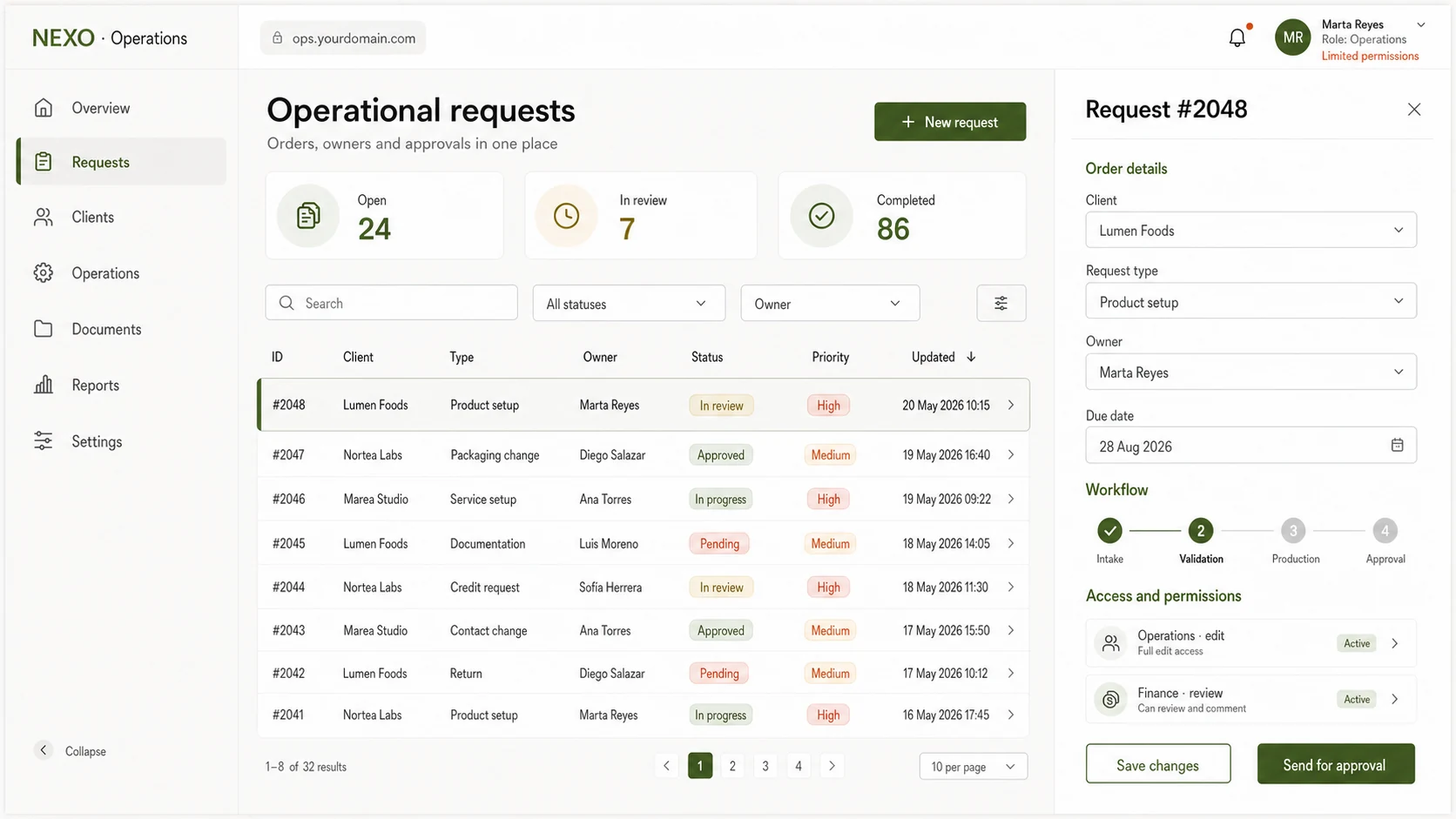
Visual pending 16:9
Internal App · interface / workflow — lists, forms, states and permissions of a delivered internal tool
The data is anonymised: what matters is the structure of the tool and the workflow it solves.
Service: Internal apps

“We had seven spreadsheets and none of them matched. Now there is a single dashboard where each area enters its own data and the real state of every project is visible.”

▲ A single source of data
LT
Lucía Tarantino · Operations Manager
Construcciones Río · Argentina
What can be claimed

An internal tool is either adopted or it isn’t.

The best development fails if the team keeps using the old spreadsheet in parallel. That is why the process involves the people who will use it from the start, and real adoption is measured — not just the software delivery.

View all testimonials
Frequently asked questions

Common questions before building

The initial analysis answers these questions with your specific process on the table.

Isn’t buying ready-made software cheaper?+
In many cases yes, and that is the first thing we assess. Standard software has predictable cost and vendor support. Building is justified when the process is specific to the business and forcing it into a generic tool would mean working worse.
What if the process changes within a year?+
It is designed assuming it will change: configurable states, extendable fields and documentation of the data model. Deep changes require work, but not rebuilding from scratch.
Who maintains the tool afterwards?+
That is agreed from the start. It can stay under studio maintenance, be transferred to an internal team with the corresponding documentation, or a combination of both. What we don’t do is hand over something nobody can sustain.
Can it connect with our ERP or CRM?+
It depends on each system’s integration options. If there is an API or exports available, it connects. If the system is closed, alternatives are raised during analysis, before committing to the integration.
How long until something is working?+
It depends on scope, but the approach is to put a first useful version into use as soon as possible rather than waiting months for a complete delivery. The specific timeline is estimated after analysing the process.
Can we start with part of the process?+
That is the recommended route. The most painful point is picked and solved, and real usage decides what to extend. Building everything at once tends to produce features nobody uses.
What if the team resists giving up the spreadsheet?+
It is a real risk, and that is why the people who will use the tool are involved from the analysis stage. If the application doesn’t solve things better than the spreadsheet, the resistance is right and the design needs reviewing, not insisting.

Services that usually go with it

Before building, it is worth checking whether the process can be solved another way.

To go deeper

How to decide between automating, integrating or building.

Also available in AI Hub

Before building a bespoke tool

If what is missing are AI capabilities for the team’s work — chat, documents, agents, content — AI Hub can cover them with no development, with users and permissions managed by the organisation.

When the process is your own and needs an application with its own logic, data and roles, custom development remains the recommended route.

Explore AI Hub
Related areas in the platform
01Chat, research and knowledge
06Agents and automation
10Files and integrations
09CRM and operations

Tell us which process is currently being run on spreadsheets.

With the process, the people involved and the current systems, we can estimate whether building, integrating or automating is the right route. The answer is not always to build.