Enterprise AI

AI connected to your company’s systems, information and processes.

We implement artificial intelligence on an organisation’s real operation. It can take the form of a connected agent that queries information and executes tasks, or of a centralised conversational environment so different teams work with AI under common users, permissions and policies.

Approach 01 · how it processes a request
1
The query is asked
In natural language, from the channel the team already uses.
2
Permissions are checked
The assistant only reaches what that user is allowed to see.
3
It queries the connected systems
ERP, CRM, invoicing, documents or the available APIs.
4
It answers or executes the action
Returns the data, or creates and updates within what is authorised.
5
It logs the operation
Traceability remains of what was queried and what was modified.
At a glance

Enterprise AI brings together artificial intelligence solutions designed around an organisation’s systems, data and processes. It can be implemented as a connected agent that queries information and executes authorised actions, as a centralised conversational environment for multiple users and areas, or through an architecture combining both approaches. The aim is to add AI over the tools the company already uses — ERP, CRM, invoicing, documents, spreadsheets, databases and APIs — with access controls, integrations and policies adapted to each case.

It isn’t a chatbot: it’s a layer over your operation

A connected assistant answers from your company’s authorised sources, not from loose information: it queries what exists, interprets it and returns the data with its origin. The architecture is oriented towards reducing unfounded answers, and every query is traced. When the task involves writing — creating a record, updating a status, sending a document — it does so only within the permissions defined for each user.

The difference from a chatbot lies in scope and control: conversation with customers on web, messaging or phone belongs to the Chatbots and conversational agents service; Enterprise AI works on the internal operation, the data and the authorised actions inside the company’s systems. Both projects can be combined.

If what you need is a ready platform for your team to access multiple AI tools, see AI Hub. Enterprise AI is the bespoke design and implementation service built around your organisation, your data and your permissions.

Commercial models Open-weight models Private infrastructure Self-hosted Hybrid architectures
The underlying decision

Two ways to bring AI into the operation

Not every organisation needs the same architecture. In some cases it makes sense to start with an agent connected to particular tools and processes. In others, the aim is to give the whole company a centralised environment from which to work with AI, documents and systems under common administration.

Approach 01 The starting unit is the use case.

Connected enterprise agent

An agent that works on specific tools and systems.

An enterprise agent can query information, work with documents, use tools and execute authorised actions within the systems the company already uses. It is configured for one or several concrete use cases and can extend its capabilities through integrations, tools and specific knowledge.

It fits when the need is
Resolve a concrete process.
Query several sources from one conversation.
Automate tasks that require reasoning.
Use tools from natural language.
Execute authorised actions.
Work with contextual information.
Assist a specific person or team.
Add capabilities progressively.
Analyse a use case →
Approach 02 The starting unit is the organisation.

Conversational operating system

A centralised enterprise environment to work with AI, information and systems.

An AI environment of the company’s own from which users can converse with information, documents and tools, with profiles, models, permissions and integrations administered centrally. Each person keeps their own workspace; the organisation keeps common administration over the available capabilities.

It fits when the need is
Give several teams access to AI at once.
Centralise users, profiles and permissions.
Define which models can be used.
Work with corporate documents and projects.
Order which sources each area sees.
Administer tools from a common catalogue.
Replace scattered AI tools with a single environment.
Extend the scope department by department.
Analyse an enterprise implementation →

Both belong to Enterprise AI, can be contracted separately depending on the project, and can also evolve or be combined into a single architecture.

Approach 01

Connected enterprise agent

AI that queries, uses tools and executes authorised actions. It isn’t an isolated chatbot: it is a layer working on real systems and tools.
“How much stock is left of product X45?” “What were this month’s sales?” “Find this client’s outstanding invoices.” “Which orders are still pending?” “Find the document related to this project.” “Compare this month’s sales with last month’s.” “Summarise this information and prepare a report.”

The availability of each query or action depends on the integration, the enabled tools, the permissions, the quality of the data, the architecture and the systems available.

The architecture, seen as a whole

AI isn’t installed: it connects to where the work already is.

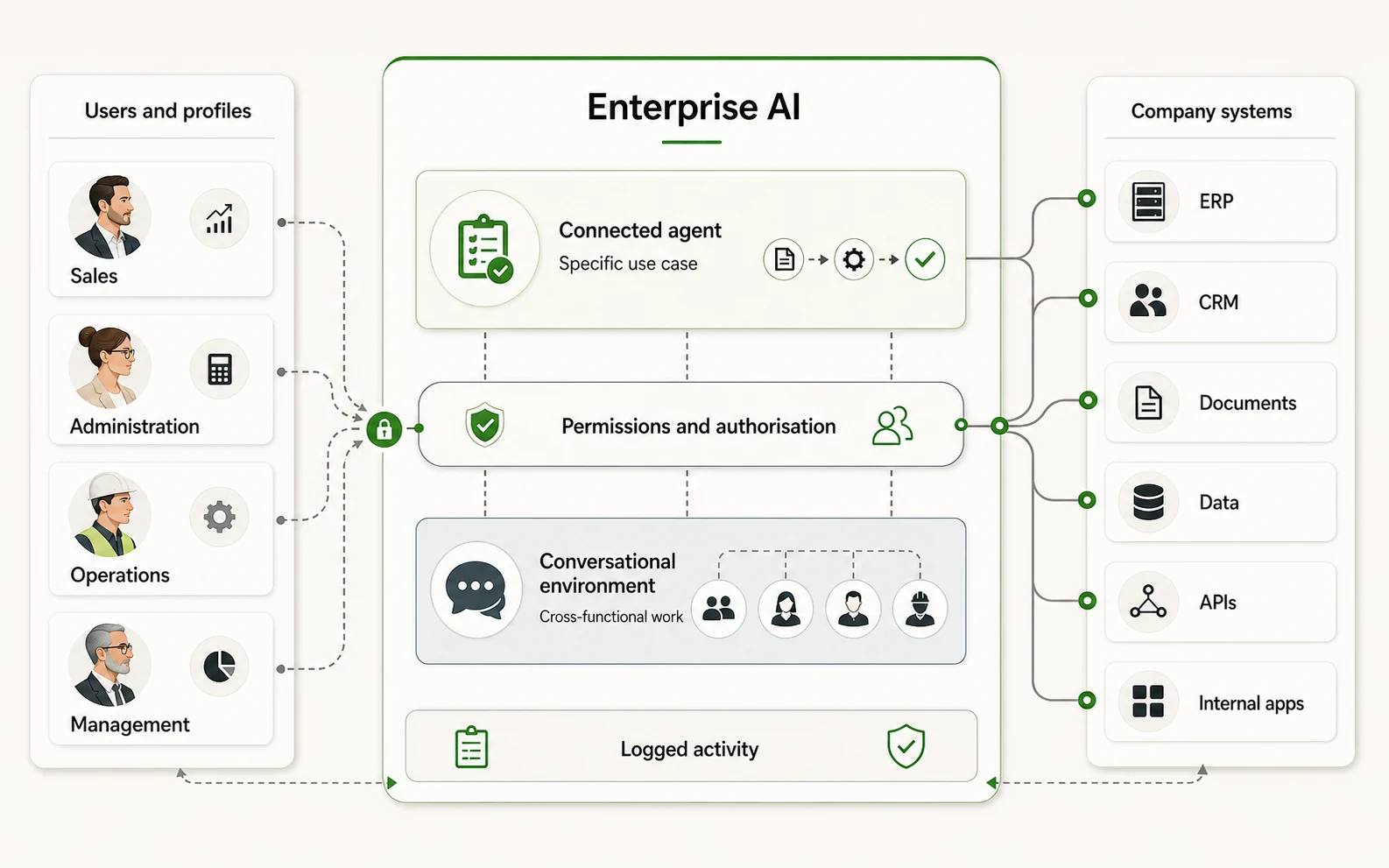
Both approaches share the same structure: users and profiles, an AI layer with its permissions, and the organisation’s systems where the action happens. What changes between them is the scope, not the architecture.
Visual pending 16:10
One diagram explains both approaches: the connected agent resolves a use case end to end; the conversational operating system is the cross-cutting layer of work.
Visual pending 4:3
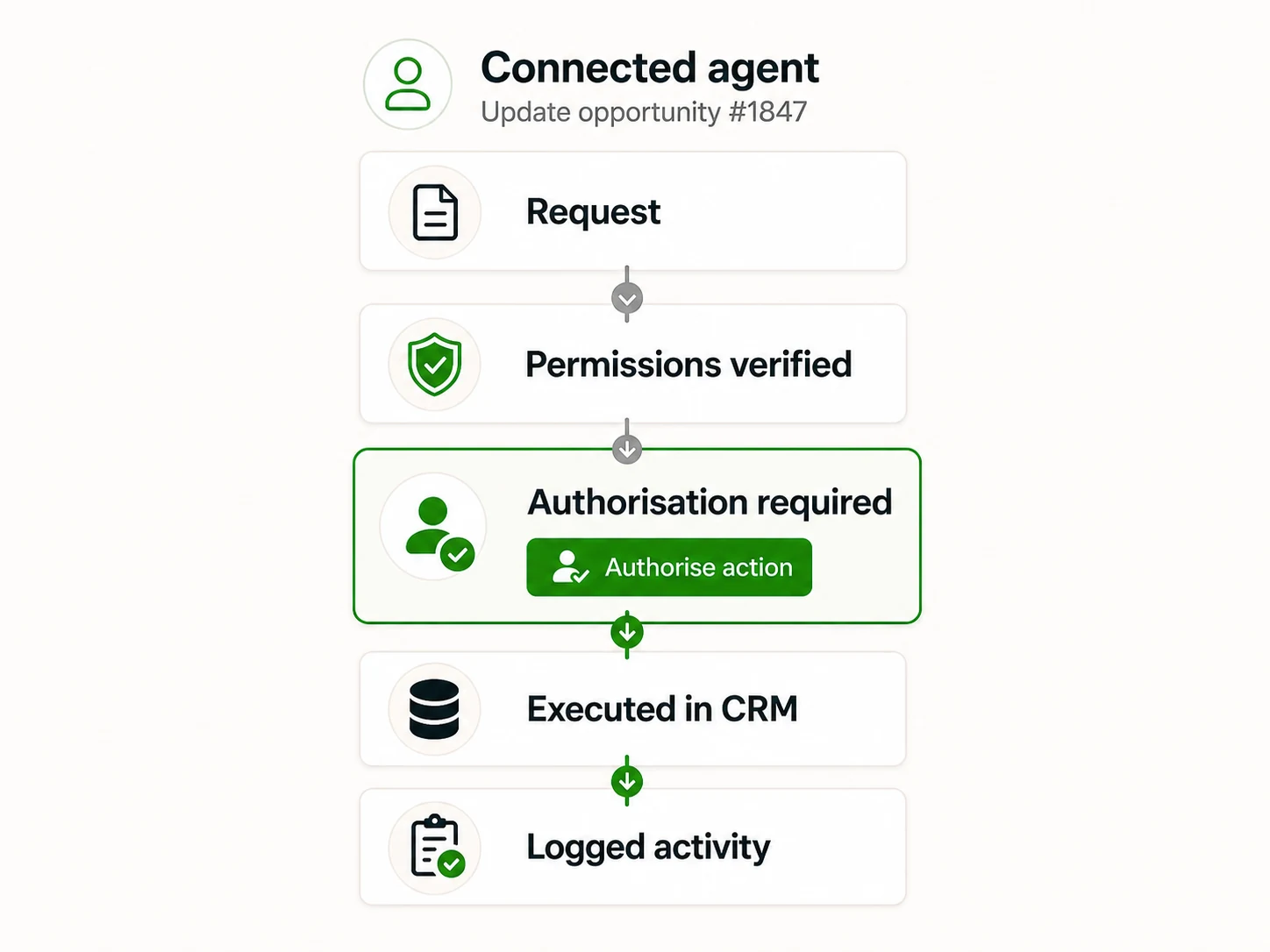
The agent flow shows what distinguishes this architecture from a generic assistant: there is a point of authorisation and everything is logged.
Who it’s for

Companies with systems already running and teams losing time querying them.

Companies with several systems in use. ERP, CRM and invoicing coexist, but don’t talk to each other.
Teams that depend on others to query data. Requesting a simple report means waiting for somebody else.
Organisations with scattered documentation. Contracts, procedures and prices live in different folders.
Areas with repetitive, authorisable tasks. Updating statuses, sending reminders or generating documents.
It is not for every case. If the information is disorganised or duplicated across systems, the data and the integrations should be tidied first. The assessment detects that before committing to an implementation.
Common situations

Signs your company may need this

Answering a routine question means opening three or more tools.
The team asks over internal chat for data that is already in a system.
Reports are requested from one person who becomes a bottleneck.
The information exists, but nobody remembers where the current version is.
Generic chatbots have been tried and they don’t answer with real data.
There is concern about where the data would be hosted if AI were introduced.
Results

What changes day to day

Real scope depends on the systems available and on the quality of the data. These are the changes an implementation aims for, not guaranteed figures.

Answers in seconds

Frequent queries resolved without opening several tools or requesting a report.

Fewer internal interruptions

The team stops depending on one person to reach data that already exists.

Tasks executed with control

Create, update or send within the permissions defined for each user.

Traceability of every action

A record of what was queried and what was modified, available for audit.

Accessible knowledge

Documents and procedures stop being folders nobody can find.

An informed decision about AI

The assessment states whether the case justifies implementation, and at what scope.

Scope

Systems it can connect to

ERP CRM Invoicing Email Calendar E-commerce Inventory Documents Databases Internal APIs
Deliverables of an implementation
01Map of systems, data sources and permissions per profile.
02Scope definition: which questions it answers and which actions it executes.
03Implementation of the integrations and the query layer.
04Testing with the team’s real cases and answer tuning.
05Documentation, training and a plan for later evolution.
Use cases

Real questions and tasks

Invoicing “Which of this client’s invoices are still unpaid, and for how much?”
It queries the invoicing system and returns the list with amounts and due dates.
Inventory “How much stock is left of this reference and when does the next delivery arrive?”
It cross-checks inventory and purchase orders to answer with the estimated date.
CRM “What stage is the proposal we sent this company at?”
It retrieves the opportunity status and the last logged interaction.
Documents “What is the current version of the returns procedure?”
It locates the current document and cites the relevant passage.
Calendar “Book a review with the operations team next week.”
It creates the event if the user has permission; if not, it proposes it.
Action “Update this order’s status to prepared and notify the customer.”
It executes the change and the notification within what is authorised, and logs it.
How we work this service

Four stages, each ending in a clear decision.

No project starts by choosing a model. It starts by understanding which questions the company needs answered and which systems can support them.

01 Assessment

The systems, the quality of the data and the questions the team needs answered are reviewed.

Recibes: viability report and recommended scope
02 Design

The architecture, the model, the infrastructure and the permission and logging scheme are defined.

Recibes: technical proposal and implementation plan
03 Implementation

Sources are connected, the query layer is built and it is tested with real cases.

Recibes: working assistant in a test environment
04 Validation and evolution

It is tuned with real use, the team is trained and the scope extension is planned.

Recibes: documentation and improvement plan
Security and governance from the first stage. We define which data falls within scope, who can query it, which actions are permitted and how they are logged. Where the case requires it, the architecture can use private infrastructure, local models or minimisation mechanisms designed to reduce information exposure. How data is processed depends on the models, providers, integrations and architecture chosen.
Approach 02

Conversational operating system

A centralised enterprise environment to work with AI, information and systems.

A conversational operating system is an enterprise AI environment from which users can converse with the company’s information, documents and tools, using profiles, models, permissions and integrations administered centrally.

It is not an operating system like Windows, macOS or Linux. “Operating system” describes its role here: the layer where the company’s people, artificial intelligence, information, tools and systems are coordinated.
What the layer coordinates
+ People
+ Artificial intelligence
+ Information
+ Tools
+ Systems

A common front door to AI for the whole organisation.

Instead of each employee using isolated AI tools and configuring their own environment, the company can have a centralised corporate platform from which to administer users, AI profiles, models, tools, permissions, documents and integrations.

Each person keeps their own workspace and conversations, while the organisation retains common administration over the available capabilities. The system can be implemented progressively and connected to existing systems when the use case requires it.

An environment of the company’s own
Company
identity and corporate policy
ai.company.com
your own domain or subdomain, when the chosen architecture allows it
Users
individual access per employee
AI profiles
capabilities authorised for each function
Documents · Tools · Systems
what each profile can query and use

From that environment, employees log in with their own users and work with the capabilities authorised for each function.

A workspace for each user

Each employee has their own access and conversations independent of the rest of the team. They can:

Hold their own conversations.
Work with documents.
Organise projects.
Query authorised information.
Use enabled tools.
Access the AI profiles for their function.
Corporate administration controls which capabilities are enabled, without turning individual conversations into a shared space by default. The detail of retention and visibility is defined in the specific implementation.

Different AI profiles for different areas

General AI

Documents, analysis, writing and general queries.

Sales AI

Customers, products, prices, opportunities, sales and stock where the necessary integrations exist.

Administration AI

Administrative documentation and authorised operations.

Operations AI

Orders, processes, inventory, tracking and operational documentation.

HR AI

Documentation and knowledge for the area, subject to specific permissions.

Management AI

Analysis, reports and a cross-cutting view over authorised sources.

Each profile configures Instructions Knowledge AI models Tools Integrations Access levels

The examples are configurable: they don’t imply that every organisation needs the same profiles.

Documents and projects inside the same environment

PDF DOC / DOCX Spreadsheets CSV Presentations Other supported formats
Ask about the documents.
Compare them with each other.
Summarise them.
Extract specific information.
Generate analysis.
Use them as context.
Organise conversations and materials by project.
Common projects Client Commercial analysis Budget Launch Financial report Onboarding Research

An AI layer over the tools the company already uses

Adding AI doesn’t require replacing the existing systems. Employees can keep using their usual tools while AI is added as an additional route for querying and acting.

ERP CRM Databases Local Excel Shared Excel Google Sheets Google Drive Microsoft 365 OneDrive SharePoint Internal applications Enterprise software APIs Cloud services
Connection methods according to the case API MCP Database access Custom integration Other technically appropriate methods
The environment on screen

A working environment, not a chat window.

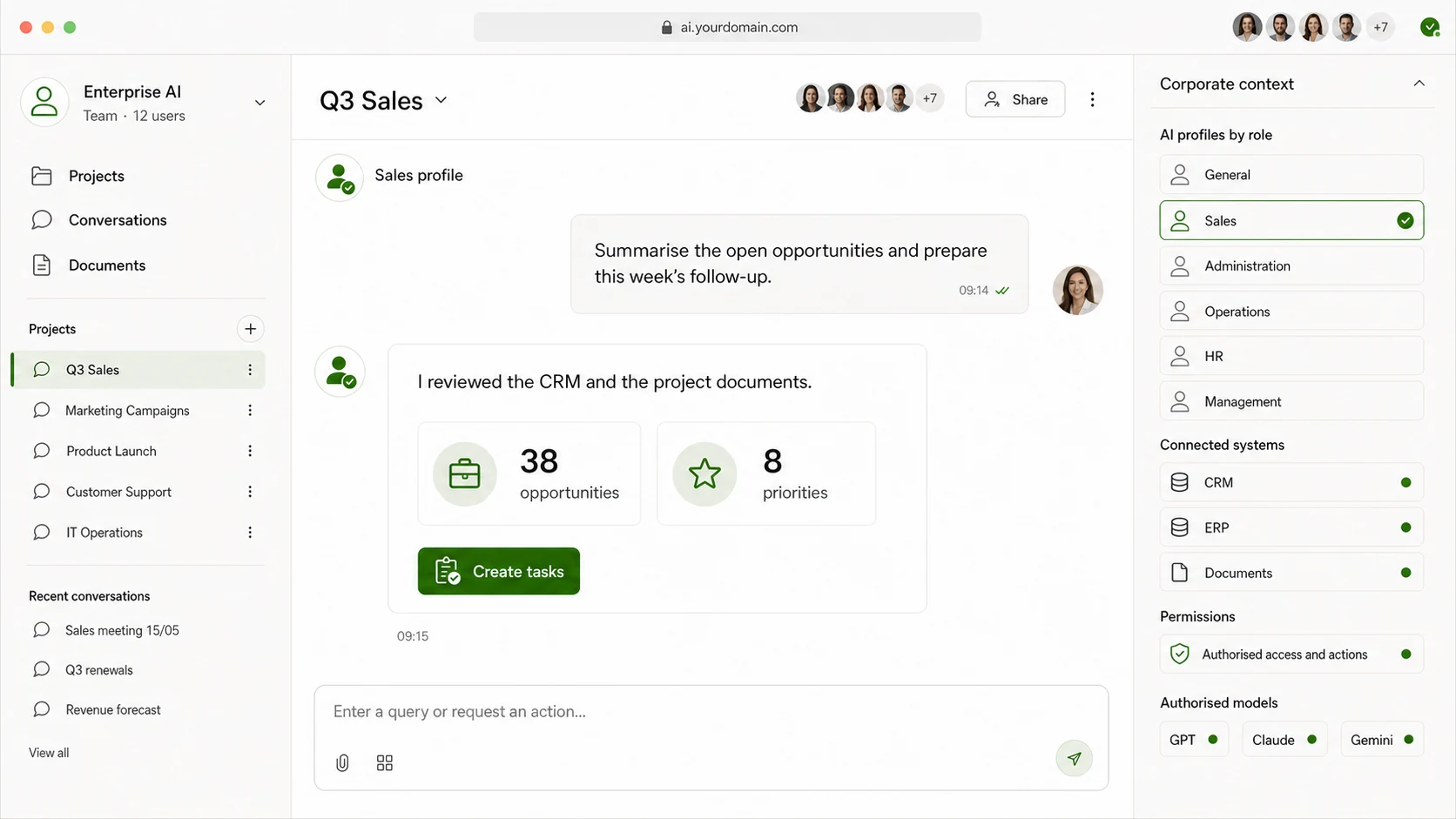
Several users, their projects and conversations, AI profiles by area, documents, permissions and the connected systems: what distinguishes a conversational operating system is that the organisation’s context lives inside it.
Visual pending 16:9
The profiles by area — sales, administration, operations, HR, management — are the evidence that this is a multi-user environment with permissions, not an individual account.
Queries

Asking the company in natural language

The user’s documents Connected enterprise systems
Conversational operating system
Answer
Actions

From querying information to acting on it

When the corresponding integrations and permissions exist, users can request actions:

Log a sale.
Update a customer.
Add information to an Excel file.
Modify authorised data.
Create a record.
Update an order status.
Generate a report.
Update information in a management system.
The available actions depend on each integration and on the permissions assigned to the user. Sensitive operations may require prior confirmation and be logged.
Control, privacy and models

Each user reaches only what they need.

The controls that matter are implemented technically: they don’t depend on an instruction inside a prompt. The level of protection achievable in each project depends on the models, providers, integrations and architecture chosen, and is documented before implementing.

Permissions by area
Sales
customers · products · prices · stock
HR
authorised documentation for the area
Administration
authorised administrative and financial information
Management
cross-cutting sources defined for that profile
User Group Department Source Tool Operation
Data minimisation
Not all the information needs to reach the model
Original source
Name ID document Email Phone Bank details Sales Margin
↓ minimisation rule ↓
Information needed
Identifier Sales Margin Segment
· Exclude fields that aren’t needed.
· Minimise the information sent.
· Apply access by area.
· Restrict sensitive data.
· Limit the use of certain data in external models.
· Select different models according to the privacy level.
Models
The architecture can combine several
Authorised external models
General-purpose ones, when the data allows it.
Specialised models
Tuned to a domain or a type of task.
Private models
Under the organisation’s control.
Locally hosted models
When necessary and technically viable.
Use case Privacy Performance Cost Sensitivity Infrastructure

The user doesn’t need to choose the model for each task if the organisation defines centralised policies. We don’t commit to a specific architecture before the technical assessment.

Implementation

There is no need to connect the whole company from day one

Starting with a concrete scope allows the value and the viability to be proved before extending the solution to the rest of the organisation.

Initial stage
A functional, operational demonstration
Enterprise platform.
Initial users.
Permissions.
Agreed AI profiles.
Selected models.
Work with documents.
Organisation into projects.
Initial policies.
One previously defined pilot integration.
Evolution
What can be added later
New departments.
New sources.
New systems.
More profiles.
New integrations.
New actions.
New models.
Analyse an enterprise implementation See how it works
Comparison

How the two approaches differ

Connected enterprise agent
Conversational operating system
Starting point
Connected agentA use case or a task
Conversational operating systemThe organisation and its teams
Who uses it
Connected agentOne person or one team
Conversational operating systemSeveral users and several areas
What it’s for
Connected agentExecuting and resolving
Conversational operating systemCentralising and ordering
Tools
Connected agentThose that agent needs
Conversational operating systemAn administered catalogue
Information
Connected agentThe sources for the case
Conversational operating systemAuthorised corporate sources
Actions
Connected agentYes, within what is authorised
Conversational operating systemYes, per profile and integration
Profiles by area
Connected agentOptional
Conversational operating systemA central part of the environment
Administration
Connected agentPer solution
Conversational operating systemCentralised
Documents and projects
Connected agentAs the case requires
Conversational operating systemA corporate workspace
Where it lives
Connected agentFlexible, wherever suits
Conversational operating systemThe company’s own environment
How it grows
Connected agentMore capabilities and integrations
Conversational operating systemMore areas, users and systems

Which approach does your company need?

The most mature scenario

Combined architecture

The two approaches are not mutually exclusive. A conversational operating system can incorporate specialised agents: the environment provides identity, users, permissions, profiles and administration; the agents provide specialised execution capabilities.

The environment provides
Corporate identity, users, permissions, AI profiles and common administration.
The agents provide
Specialised execution over concrete tools, systems and use cases.

Text equivalent of the diagram: users access the conversational operating system with their AI profile; from there, connected enterprise agents operate and, within the defined permissions and policies, query and act on ERP, CRM, documents, databases, spreadsheets, APIs and internal applications; each operation returns a query, an action, a result and its trace.

Users
access per employee
Users
AI profiles
capabilities per function
AI profiles
Conversational operating system
identity, environment, administration
Conversational Operating System
Connected enterprise agents
specialised execution capabilities
Connected enterprise agents
Permissions and policies
what each profile can see and do
Permissions / policies
ERP · CRM · Documents · Databases · Excel · APIs · Internal apps
what the company already uses
Systems
Query · Action · Result · Trace
what it returns and what gets logged
Query / action / result / trace

Note: Conversational Operating System describes an enterprise AI interaction layer, not a traditional operating system.

Service: Enterprise AI

“We connected the ERP and invoicing to the assistant. Today the team resolves in seconds queries that used to mean requesting a report and waiting.”

▲ Less time on internal queries
MF
María Belén Ferraro · Operations Director
Grupo Andes · Argentina
What can be claimed

We don’t promise savings percentages before seeing the systems.

The impact of an assistant depends on the volume of queries, the quality of the data and how many systems can be connected. During the assessment the scope is estimated with the company’s real data, and what is measurable from day one is defined.

View all testimonials
Frequently asked questions

What people ask before starting

If your question is not here, the assessment is where we answer it with your company’s context.

What is the difference between an enterprise agent and a conversational operating system?+
The agent starts from a use case: it is configured to resolve concrete tasks using particular tools and sources. The conversational operating system starts from the organisation: it is a common environment where several teams work with AI under centrally administered users, profiles, models and permissions. One resolves; the other orders and gives access. Which to choose depends on what the company needs first.
Can both approaches be used together?+
Yes, and that is the most mature scenario. The conversational environment provides identity, users, profiles and permissions; the agents provide specialised execution capabilities within that environment. You can start with either and reach the combined architecture later.
Do we need to replace our current systems?+
No. The approach is to add an AI layer over the tools already in use. Teams keep working with their usual systems and AI is added as an additional route for querying and acting. If a system offers no suitable integration route, alternatives are assessed during the assessment.
Can each department have a different AI?+
Yes: distinct profiles can be defined — sales, operations, administration, management or others — each with its own instructions, knowledge, models, tools, integrations and access levels. Profiles are configurable and not every organisation needs the same ones.
Does each user keep their own conversations?+
Each employee has their own access and conversations independent of the rest of the team. Corporate administration controls which capabilities are enabled, without turning individual conversations into a shared space by default. The exact detail of retention and visibility is defined in the implementation.
Can it work with documents?+
Yes. Users can upload PDF, DOC/DOCX, spreadsheets, CSV, presentations and other supported formats, and from them ask, compare, summarise, extract information, generate analysis or use them as context. Conversations and materials can be organised by project.
Can it connect to our ERP or CRM?+
It can connect when a suitable technical method exists: API, MCP, database access or a custom integration. Which queries and which actions become available depends on that integration, on the permissions and on the quality of the data. The technical assessment confirms it before committing scope.
Can it work with Excel?+
Yes, both with files the user provides and with shared sheets — networked Excel, Microsoft 365, OneDrive, SharePoint or Google Sheets — when access is enabled. Depending on the case, it can query data and also add or update authorised information.
Can it execute actions on the systems?+
Yes, when the corresponding integration and permissions exist: create a record, update a customer, change an order status, log a sale or generate a report. Available actions are defined one by one; sensitive operations may require prior confirmation and be logged.
How are permissions controlled?+
With controls implemented technically, not with instructions inside a prompt. Permissions can be applied by user, group, department, source, tool and operation, so each profile reaches only what it needs for its function.
Can the information sent to external models be limited?+
Yes. The system can be designed to exclude fields, minimise the information leaving for the model, restrict sensitive data and apply access by area. In many cases an identifier and the necessary metrics are enough instead of complete personal data. The specific architecture is defined in the technical assessment.
Can it use private or local models?+
The architecture can combine authorised external models, specialised models, private models and locally hosted models when necessary and technically viable. The selection depends on the use case, privacy, performance, cost, data sensitivity and available infrastructure.
Can it be installed in an environment of our own?+
When the chosen architecture allows it, the environment can sit under the company’s identity and on its own domain or subdomain, of the ai.company.com kind, with access by corporate users. Viability depends on the infrastructure and the agreed scope.
Where is the best place to start?+
With a concrete scope: an initial stage with the platform, initial users, permissions, agreed profiles, selected models, work with documents and one defined pilot integration. Proving the value and the viability at that scope is cheaper than connecting the whole company from day one.

Services that usually go with it

An assistant performs better when the data is already tidy and connected.

To go deeper

Articles that explain the approach before a decision is made.

Guidance

Which AI solution do you need?

Six frequent intentions and the service or approach that matches each. All of them can be combined in one project; this table helps place where to start.

What you need
Service
I want AI to carry out tasks using my tools
Connected enterprise agent
I want to give the whole company a centralised AI environment
Conversational operating system
I want both
Combined architecture
I want a ready platform with many AI tools by subscription
AI Hub
I want automated support on web, WhatsApp, Instagram or phone
Chatbots and conversational agents
I’m not sure yet
Request an AI assessment
Also available in AI Hub

When the team needs tools, not a bespoke integration

Enterprise AI is built on your systems. If the team also needs to work daily with chat, research, documents, content and automations, those capabilities are also available in AI Hub, with users, permissions and consumption managed by the organisation.

Connecting ERP, CRM or databases, defining technical permissions and executing actions on the systems remains the work of Enterprise AI.

Explore AI Hub
Related areas in the platform
01Chat, research and knowledge
02Text and productivity
10Files and integrations
06Agents and automation

Let’s start by understanding which questions your company needs answered.

The AI assessment reviews your systems, the quality of the data and the permissions required. By the end you will know whether a connected assistant makes sense in your case, and at what scope to start.