AI Hub · a comprehensive artificial intelligence platform

All the artificial intelligence your team needs, in one environment.

Get access through a monthly subscription to a platform that brings together AI tools for text, research, documents, images, video, voice, agents, automation, marketing, chatbots, CRM and many other tasks from one environment.

Demo Monthly subscription Private environment
One environment, ten capability areas
1
One access for the whole team
Users, permissions and consumption managed by the organisation.
2
Ten capability areas
Chat, text, image, video, voice, agents, social, chatbots, CRM and files.
3
Contextual tools
Each area opens the specific tools that resolve that work.
4
Models per configuration
Different providers and models available according to plan and active APIs.
5
Subscription or private environment
Access by plan, or a dedicated installation on the company’s subdomain.
At a glance

AI Hub is a comprehensive platform that centralises artificial intelligence tools for productivity, research, creation, automation, communication and operations in a single environment, available by monthly subscription or as a private environment for an organisation. It brings together multi-model chat, research, documents, text, image, video, voice, agents, social media, chatbots and CRM, with user and permission management per organisation.

A platform instead of a collection of isolated tools

Instead of using separate applications to write, research, create images, generate video, automate tasks or manage conversations, AI Hub brings these capabilities together inside one working environment, with a single login and common user management. The functions available adapt to the plan and to the configuration each organisation needs.

AI Hub is a platform you use directly. Your team gets access through a monthly subscription and uses its tools from a single environment. If you need help configuring it or integrating it with your operation, you can also contract TouringXX services for implementation, integrations, automations, onboarding, training and support.

Need something more specific?

If you need a solution designed around your organisation’s internal systems, data, permissions and processes, see Enterprise AI.

Explore Enterprise AI
Multi-model chat Research Documents Text Image Video Voice Agents Social media Chatbots CRM
Overview

This is what your team will be using

One environment with its navigation, its tool areas and the workspace where everything happens: from here you reach chat, research, image, video and agents without switching application.
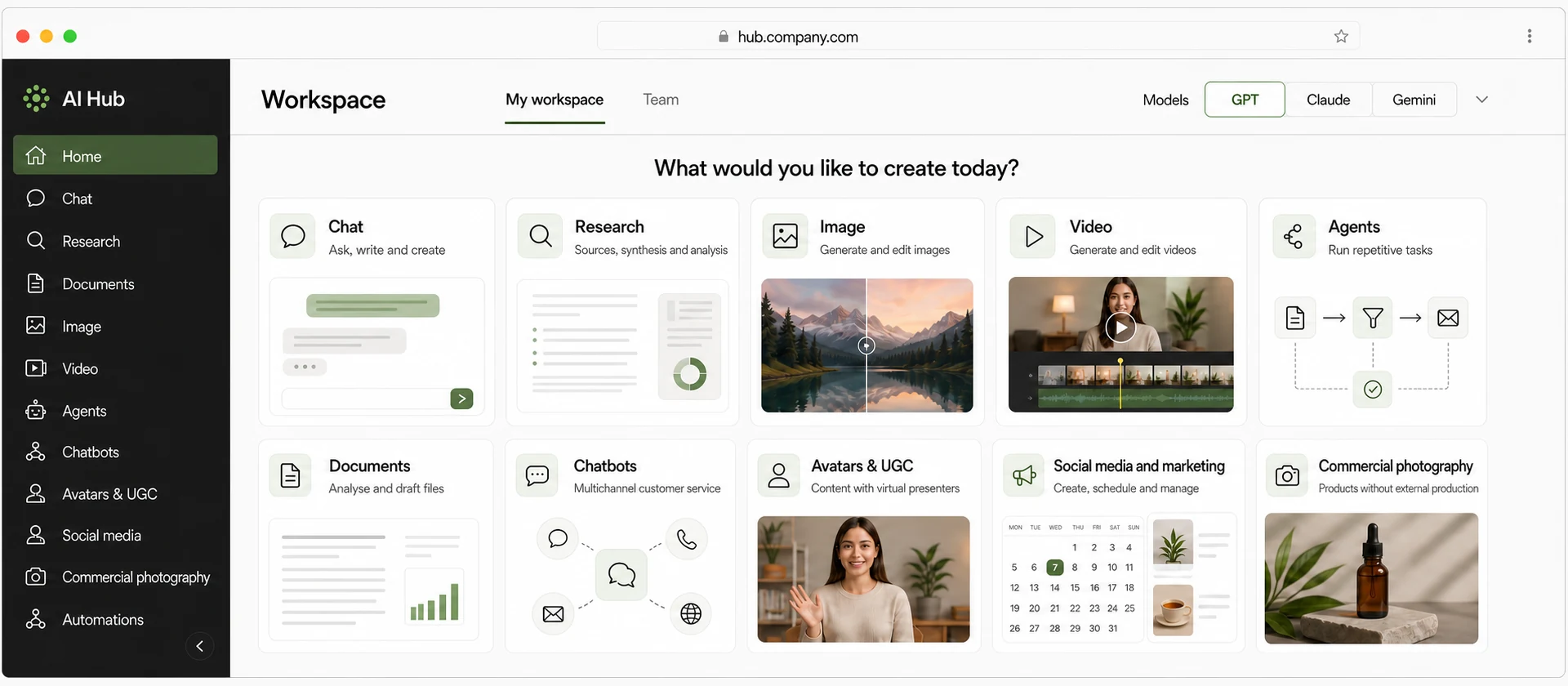
Visual pending 16:7
AI Hub · Platform Overview — main navigation, tool areas, workspace and model selector
This visual shows the platform as a whole. Later, “AI Hub · product interface” goes inside a specific tool in use, and the private-environment visual shows the instance with the client’s identity.
Who it’s for

Teams that want to centralise the AI they work with.

Teams paying for several AI tools separately. Scattered subscriptions, individual logins and no common control of spend or use.
Companies wanting to extend AI to the whole team. Marketing, sales, support and operations need different capabilities within one environment.
Organisations with control requirements. They prefer a dedicated environment, with their domain, their users and their defined limits.
Studios and agencies. Content production, research and automation for several clients from a single place.
It is not for every case. If the information is disorganised or duplicated across systems, the data and the integrations should be tidied first. The assessment detects that before committing to an implementation.
Common situations

Signs that centralising is the right move

Each person uses a different tool and nobody knows the total spend.
The knowledge and the useful prompts stay in personal accounts.
Text, images and video are needed without coordinating three suppliers.
The team wants to try AI in several areas before deciding where to invest.
The organisation needs its own environment, with its users and its brand.
Results

What changes for the team

The tools, models and integrations available may vary according to the plan and the configuration chosen. Some functions require third-party services or APIs.

One point of access

The team enters a single environment instead of splitting between scattered applications.

Combined capabilities

Research, write, create images or video and automate without switching tool.

Management per organisation

Users, permissions, limits and access according to the plan contracted.

A private-environment option

A dedicated installation, with the company’s identity and its own subdomain.

Functional overview

Ten capability areas, in one environment

Each area groups the tools that resolve that type of work. What is enabled for each organisation depends on the plan and the agreed configuration.

01

Chat, research and knowledge

Conversation with different models, real-time search, sourced research and work on your own documents.

chat with multiple models · real-time web search · advanced research with sources · chat with documents · file and image analysis · editing space · model comparison · querying and consensus across several models · brand voice · conversation memory and organisation · temporary chats
02

Text and productivity

Writing, editing and rewriting with your own templates and brand voice for the team’s daily work.

assisted writing · editing and rewriting · custom templates · brand voice · prompt library · guided article creation · summaries · emails · newsletter writing · product descriptions · FAQs · code generation and explanation
03

Image, design and photography

Creating and editing images, from brand pieces to product photography.

image generation · generative editing · variations · generative fill · object removal · background change and generation · resolution enhancement and upscaling · lighting adjustment · style transfer · sketch to image · design tools · product photography · fashion content and virtual garment try-on
04

Video, UGC and avatars

Video production and adaptation, with subtitles, dubbing and digital people.

video generation · text to video · image to video · video transformation · video editing · automatic subtitles · multilingual dubbing · digital avatars · UGC content · video from a URL or a product page · turning long videos into short clips
05

Voice, audio and music

Voiceover, transcription and voice conversation for content and support.

AI voiceovers · audio transcription · authorised voice cloning, with the holder’s consent · voice isolation · real-time voice conversation · voice bots · music generation
06

Agents and automation

Agents and scheduled tasks that execute actions on the services connected to the platform.

agent builder · visual flows · scheduled tasks · automatic actions · connectors · email automation · social media agents · blogging agents · message and comment automation · phone agents
07

Social media and marketing

Creation, calendar and publishing across several accounts, with analytics and automations.

content creation · editorial calendar · scheduling and publishing · multiple account management · analytics · social automation · campaigns and actions via WhatsApp · Telegram · publishing to WordPress · newsletter creation and management · email marketing integrations
08

Chatbots, sales and support

Conversations with customers: serving, selling and supporting from the platform itself.

trainable chatbots · integrated human support · conversation inbox · support via WhatsApp · Instagram · Messenger · Telegram · bookings · sales assistants · shopping assistants · voice and call agents
09

CRM and operations

Commercial management connected to the AI capabilities, when the plan enables it.

customer and company management · sales opportunities · sales pipeline · tasks · invoices and payments · reports and analytics · AI CRM assistance · natural-language queries · authorised actions from the conversation
10

Files and integrations

Management of generated content and connection with the tools the team already uses.

file and content management · storage · REST API · WordPress · Gmail · Outlook · Google Drive · Google Calendar · Notion · HubSpot · Mailchimp · compatible external storage · other connectors per configuration
Models. The platform can work with different providers and models — OpenAI, Google Gemini, Anthropic, Grok, DeepSeek, OpenRouter and specialised image, video and voice providers — according to the plan, the module, the configured provider, the credits and the active APIs. Not all models are automatically included in every plan.
Technological flexibility

Compatible with different AI models and providers

AI Hub can work with different models and providers according to the tool, the plan and the configuration. That makes it possible to use specialised technologies for text, research, image, video, voice and avatars from a single environment.

Text, chat and research OpenAI · Gemini · Anthropic · Grok · DeepSeek · OpenRouter
Image GPT Image · Flux · Ideogram · Google Imagen · Stable Diffusion · Midjourney
Video Sora · Kling · Seedance · Veo
Voice, audio and dubbing ElevenLabs · OpenAI · Speechify · Google · Azure
Avatars and UGC HeyGen · Synthesia · Veed

The models, providers, tools and integrations available may vary according to the plan, the APIs configured and the evolution of the platform.

Access model

Two ways to work with AI Hub

Option A · Subscription

Access for your team

The organisation accesses the platform through a plan. The availability of tools, models, credits, agents, channels and integrations may depend on the plan contracted and on the configuration.

Option B · Private environment

Your own private AI platform

AI Hub can also be implemented as a dedicated environment for an organisation, on infrastructure prepared for the client and with its own subdomain, for example ai.company.com.

Company identity Users and permissions Enabled tools Available models Usage limits Integrations Storage Own subdomain
Scope

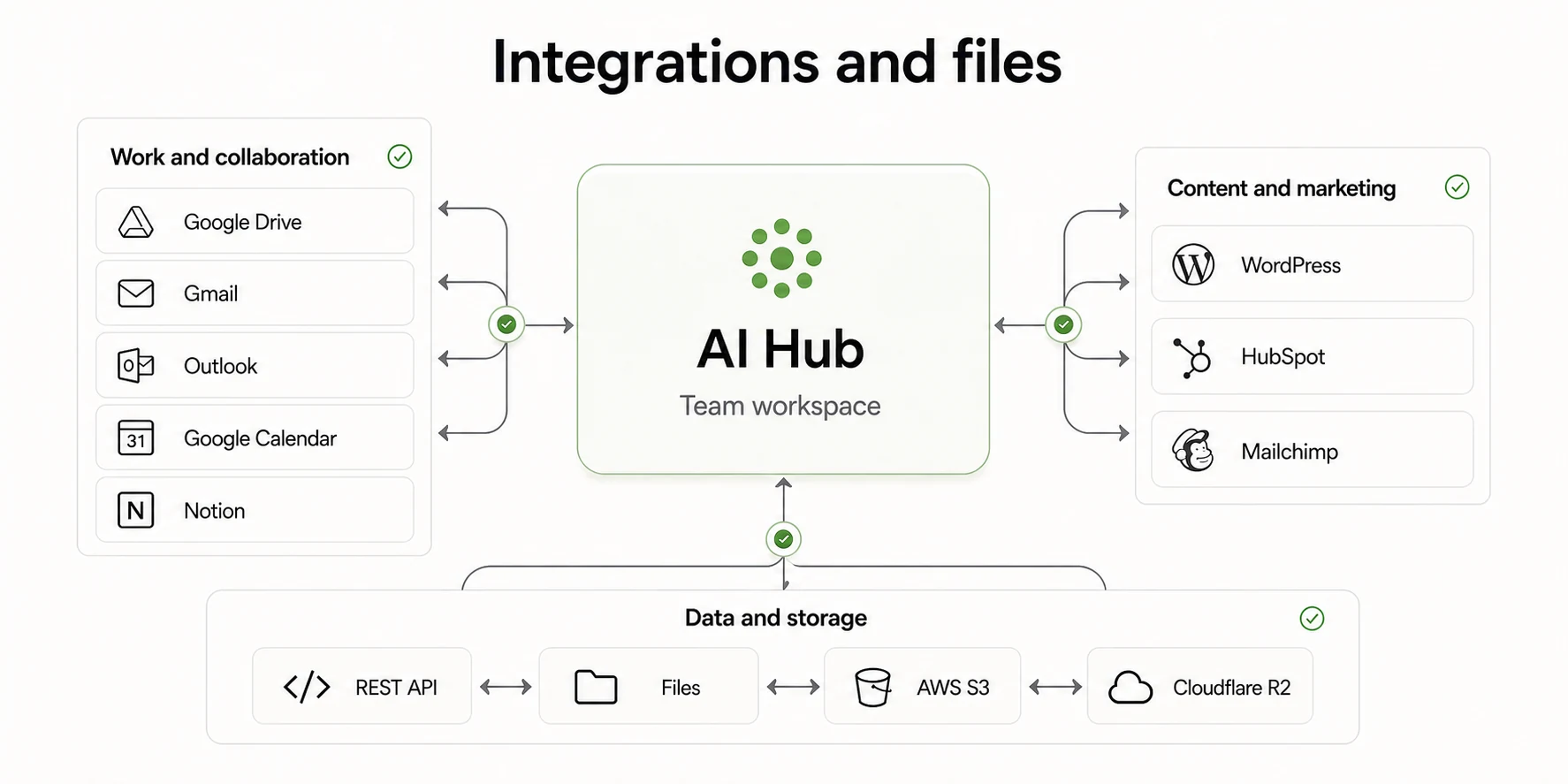
Integrations and files

WordPress Gmail Outlook Google Drive Google Calendar Notion HubSpot Mailchimp WhatsApp Telegram REST API AWS S3 · Cloudflare R2
Visual pending 2:1
AI Hub · Integrations & Files — the environment connected with the team’s tools and storage
The connectors available depend on the plan and the configuration.
Deliverables of an implementation
01Organisation, user and permission setup according to the plan contracted.
02Configuration of enabled tools, available models and usage limits.
03Connection of integrations and credentials for the services the team uses.
04Onboarding and training so each area knows which tool solves what.
05In a private environment: dedicated installation, own subdomain and company identity.
Use cases

What I can do with AI Hub

I want to… “Research and work with documents”
Multi-model chat, real-time search, deep research and conversation with PDF, DOC or CSV.
I want to… “Create copy and articles”
Writer, your own templates, editor, rewriting, prompt library and brand voice.
I want to… “Create and edit images”
Generation, editing, variations, generative fill, backgrounds, upscaling and product photography.
I want to… “Create and edit video”
Text to video, image to video, editing, subtitles, dubbing, avatars and UGC content.
I want to… “Work with voice”
Voiceover, transcription, voice isolation, voice chat and generative music.
I want to… “Automate processes”
Agent builder, scheduled agents, actions and connectors.
I want to… “Publish and manage social”
Creation, calendar, scheduling, multiple accounts and analytics.
I want to… “Serve customers”
External chatbot, shared inbox, messaging, bookings and a shopping assistant.
I want to… “Manage opportunities”
CRM with customers, companies, pipeline, tasks, invoices and reports, depending on the plan.
How we work this service

From demo to a working environment.

First you get to know the platform, then you choose the modality. The configuration is tuned to the areas that will really use it.

01 Demo

You request access to the demo environment to get to know the tools before choosing a modality.

Recibes: demo access
02 Choice of modality

A subscription for the team or a private implementation, according to control, users and requirements.

Recibes: plan or installation proposal
03 Setup

User setup, enabled tools, integrations and the credentials required.

Recibes: working environment
04 Adoption

Onboarding per area, good practice and tracking of the team’s real usage.

Recibes: training and evolution plan
Configuration and access from the first stage. When the environment is set up, users, access, enabled tools, models, limits and integrations are defined according to the modality contracted. Advanced privacy, data governance or internal-system integration needs are analysed specifically when the project requires it, and in that case the starting point is Enterprise AI.
The platform on screen

One environment, every capability in view.

The value of AI Hub is understood by seeing it: a tool rail, a workspace and the history of everything the team produces.
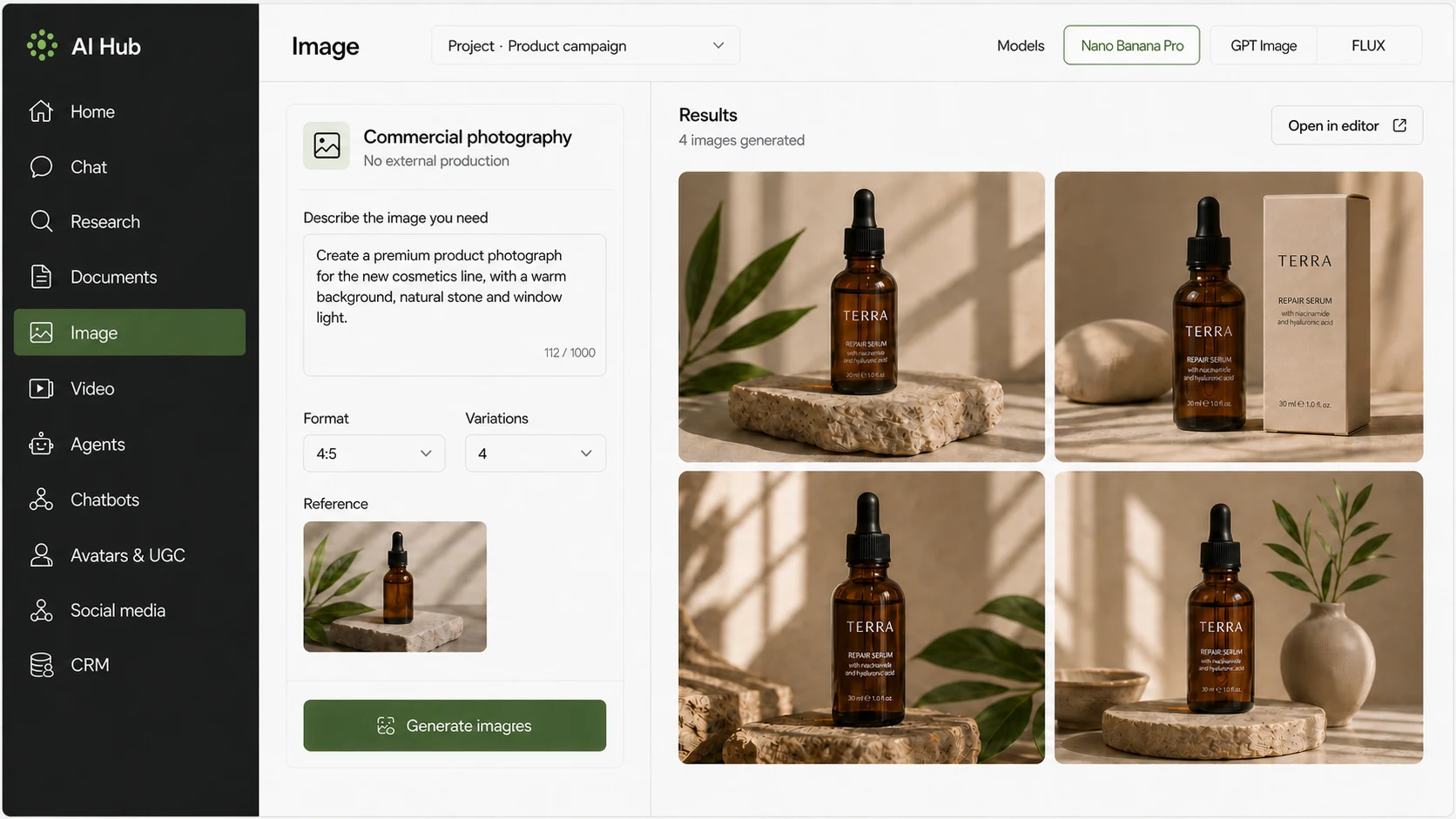
Visual pending 16:9
AI Hub · product interface — workspace, tool rail, chat, research, image, video and agents
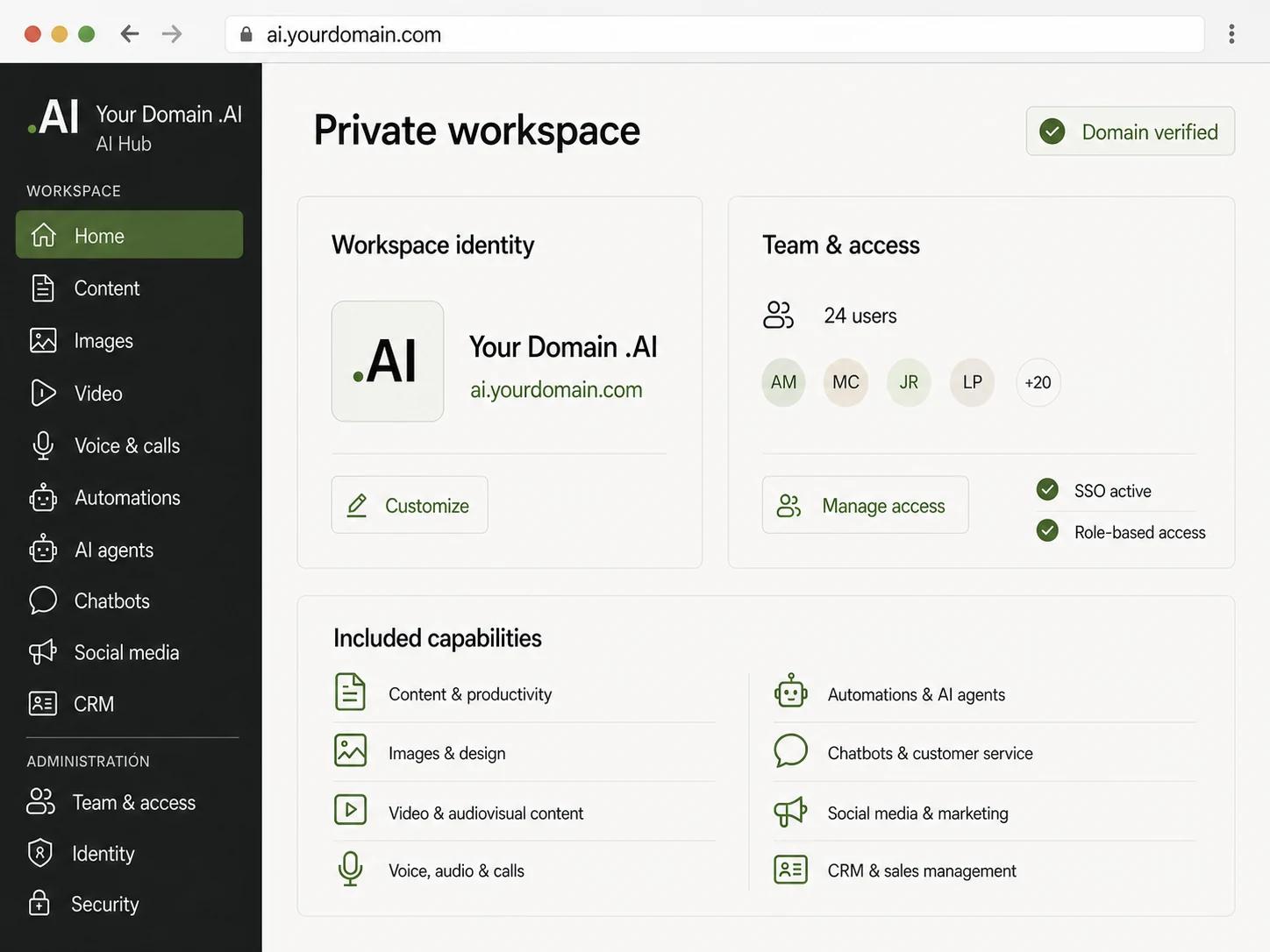
Visual pending 4:3
Private AI Hub · ai.company.com — enterprise environment with the client’s branding, users, tools and access

The private environment is shown with the client’s domain and identity: it is the visible difference between using the platform and having it as your own.

Service: Enterprise AI

“We connected the ERP and invoicing to the assistant. Today the team resolves in seconds queries that used to mean requesting a report and waiting.”

▲ Less time on internal queries
MF
María Belén Ferraro · Operations Director
Grupo Andes · Argentina
What can be claimed

The functions available depend on the plan and the configuration.

The impact of an assistant depends on the volume of queries, the quality of the data and how many systems can be connected. During the assessment the scope is estimated with the company’s real data, and what is measurable from day one is defined.

View all testimonials
Frequently asked questions

Frequently asked questions about AI Hub

If your question is not here, the assessment is where we answer it with your company’s context.

How does the AI Hub subscription work?+
AI Hub works on a monthly subscription. Access, users, tools, models, credits and available capabilities depend on the plan contracted and the corresponding configuration. Some functions may use external APIs or providers with specific conditions.
Can I use any AI model with any tool?+
Not necessarily. Each tool works with the providers compatible with that function, and availability depends on the plan and the APIs configured. The list of models and providers evolves with the platform: it isn’t a closed or contractual catalogue.
What is AI Hub?+
A comprehensive artificial intelligence platform that brings together, in a single environment, tools for chat, research, documents, text, image, video, voice, automation, agents, social media, chatbots and CRM. It can be contracted by subscription or implemented as a private environment.
Do I need to contract several AI tools separately?+
That is precisely the problem it solves: instead of maintaining scattered subscriptions, the team works from a single login with combined capabilities. Some specific functions may require third-party services or APIs.
Which AI models can I use?+
The platform can work with different providers and models — commercial and open-weight — according to the plan, the module, the APIs configured and the credits available. Not all models are automatically included in every plan.
What does a subscription include?+
Access to the environment with the tools, models, credits, agents, channels and integrations corresponding to the plan contracted.
Can I try the platform before contracting it?+
Yes. You can request free access to the demo and explore the tools available in a demonstration environment before choosing a modality.
Can it be installed in a private environment?+
Yes. AI Hub can be implemented as a dedicated environment for an organisation, on infrastructure prepared for the client, with its own users, permissions, enabled tools and limits.
Can it use my company’s domain?+
Yes. A private environment can be published on its own subdomain, for example ai.company.com, with the organisation’s visual identity.
Can the available tools be customised?+
Yes. Which modules and models stay enabled for each team or profile is defined, along with the usage limits the organisation needs.
Can I connect AI Hub with other applications?+
Depending on the configuration, WordPress, Gmail, Outlook, Google Drive, Google Calendar, Notion, HubSpot, Mailchimp, WhatsApp, Telegram, S3 or R2 storage and a REST API can be connected.
Does it include chatbots and agents?+
The platform includes conversational and agent modules. The design, the specialised configuration and the implementation on the client’s channels belong to the Chatbots and conversational agents service.
Can I use it to create images and video?+
Yes: image generation and editing, text to video, image to video, editing, subtitles, dubbing, avatars and UGC content, with the availability the plan sets.
Can my whole team use it?+
Yes. The organisation manages users, permissions and limits; each area uses the tools it needs within the same environment.
How are credits and external providers handled?+
Certain functions consume credits or depend on third-party APIs. Consumption and external services are explained before contracting and may vary by plan.
What is the difference between AI Hub and Enterprise AI?+
AI Hub is a platform of tools for the team’s work. Enterprise AI is a bespoke project that connects AI models with the company’s internal systems, data and processes to query information and execute authorised actions.
What is the difference between AI Hub and the Chatbots service?+
AI Hub offers conversational modules within the platform. The Chatbots and conversational agents service is the specialised implementation on the client’s channels: web, e-commerce, WhatsApp, Instagram and phone.

Services that usually go with it

An assistant performs better when the data is already tidy and connected.

To go deeper

Articles that explain the approach before a decision is made.

Demo

Request free demo access

Request access and explore the tools available in a demonstration environment before choosing a modality. We review the request and normally reply within 1–2 business days.

The tools, models and integrations available may vary according to the plan and the configuration chosen. Some functions require third-party services or APIs.
Access form
Modality Try AI Hub · Subscription for my team · Private environment · Not sure
Main use Chat and research · Documents · Text and productivity · Images and design · Video · Voice · Automation · Marketing and social · Chatbots · CRM and sales · Several
Team Just me · 2–5 · 6–20 · 21–50 · 50+ · Not defined yet
Details Name* · Company · Email* · Country · Tools you’d like to try
Request access
No credit card is required to access the demonstration.
Guidance

Which AI solution do you need?

Four distinct propositions that can be combined in one project. This table helps place where to start.

What you need
Service
Connect AI to my systems, data and internal processes
Enterprise AI
Give my team a platform of AI tools
AI Hub
Serve customers on web, WhatsApp, Instagram or phone
Chatbots and conversational agents
Reduce manual tasks between systems
Automation and integrations
I’m not sure yet
Request an assessment

Get to know the platform before choosing a modality.

The AI assessment reviews your systems, the quality of the data and the permissions required. By the end you will know whether a connected assistant makes sense in your case, and at what scope to start.