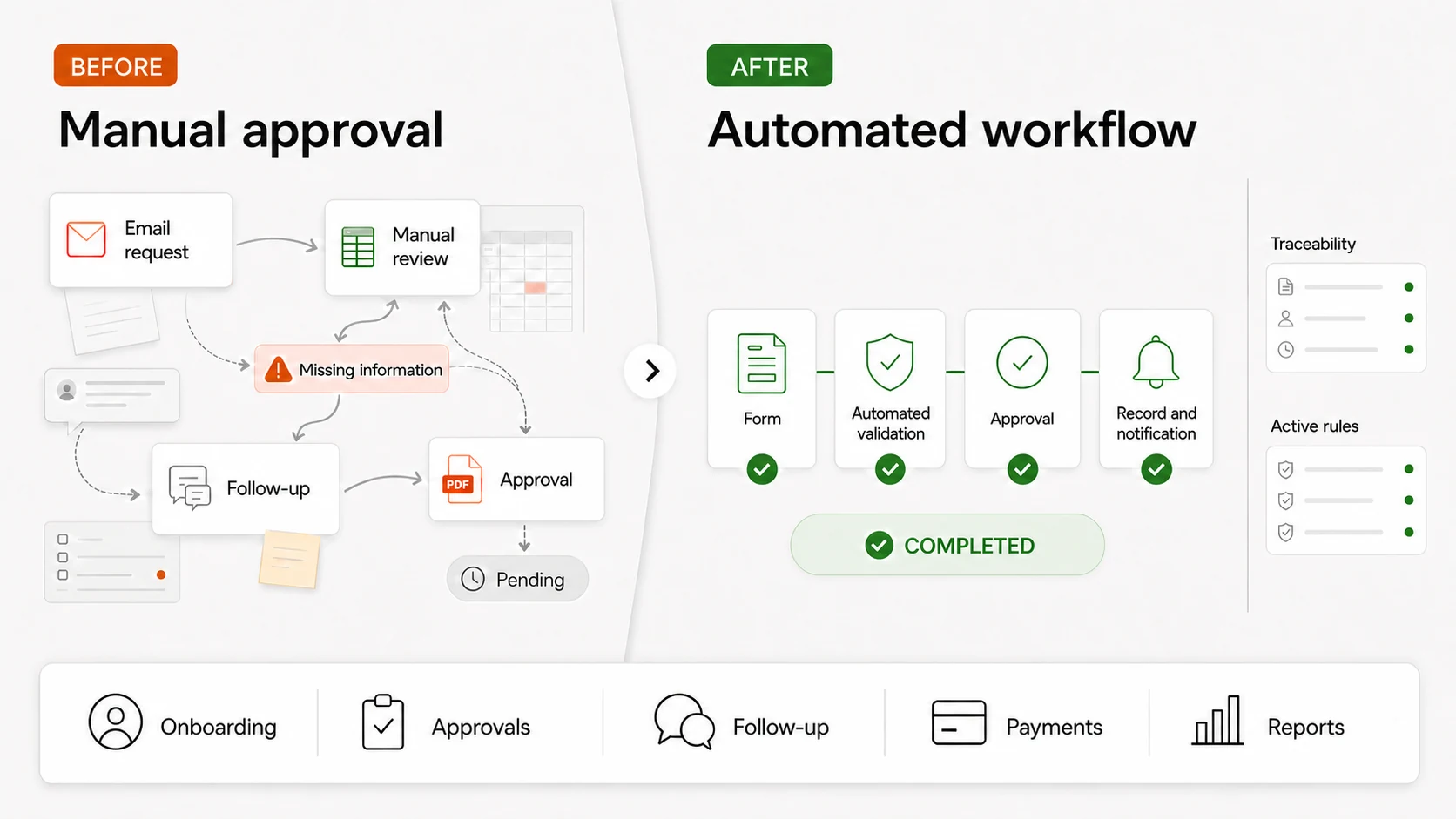
Start with client and supplier onboarding, internal approvals, sales follow-up, payment reconciliation and recurring reports. All five meet the same conditions: high volume, rules someone can write down today, and data that already lives in a system. Customer support — what almost everyone proposes first — is precisely the worst starting point.
Start with client and supplier onboarding, internal approvals, sales follow-up, payment reconciliation and recurring reports. All five meet the same conditions: high volume, rules someone can write down today, and data that already lives in a system. Customer support — what almost everyone proposes first — is precisely the worst starting point.
When a company decides to automate, the conversation usually starts with the most visible process: the one that generates most complaints, the one that demos well, the one the director mentions in the meeting. It is almost never the one worth doing.
What makes a process a good candidate?
Three conditions, and all three at once. If one is missing the project drags; if two are missing it doesn’t finish.
1
High, steady volume
Dozens of times a month, every month. If it is seasonal or exceptional, the saving doesn’t pay for the integration.
2
Rules someone can write today
If the decision depends on a person’s judgement and nobody can explain it, the first job is writing it down, not automating it.
3
Data that already sits in a system
CRM, ERP, a well-maintained shared sheet. It doesn’t matter which, but it has to exist and be up to date.
Which five are they?
In order of ease, not of impact. The first two are usually working within weeks; the last two require cleaning data first.
1
Client and supplier onboarding
A form that creates the record in the CRM, requests the missing documents and notifies whoever needs to know. It removes the email ping-pong over incomplete data.
2
Internal approvals
Holidays, expenses, discounts above a threshold. Clear rules, an escalation route and a record of who approved what.
3
Sales follow-up
Reminders based on the real state of the opportunity, not on the salesperson’s memory. What is lost by not calling back appears in no report.
4
Payment reconciliation and invoicing
Matching receipts against issued invoices, flagging discrepancies. It needs clean data, but it returns hours at every month-end close.
5
Recurring reports
The weekly report someone assembles by copying from three places. The assembly is automated; the reading stays human.
What shouldn’t you automate yet?
Some processes look like perfect candidates and are not. These three are proposed on almost every project, and all three are better left for later.
Front-line customer support
It has the most exceptions and getting it wrong is the most expensive. Automate the administrative work behind it first: ticket creation, routing, data gathering.
Decisions with commercial judgement
Approving an exceptional discount or assessing a client at risk. You can prepare the information so the decision is fast; the decision stays with a person.
Any process without an owner
If nobody answers for the result today, automating it only makes the problem happen faster and with fewer witnesses.
How do you know it was worth it?
With two numbers taken before starting. If they aren’t measured beforehand, there is no way afterwards to show the project worked.
Time per case
Before automating
Timed across five real cases, not estimated from memory.
After, at three months
The same calculation, with the cases that went through the new flow.
Errors and rework
Before automating
How many cases come back because of badly entered data.
After, at three months
How many come back now, and for which specific cause.
Who was doing it
Before automating
Name and role of whoever spent those hours.
After, at three months
What those hours are spent on now: that is the real saving.
Left column: Before automating. Right column: After, at three months.
Automating a bad process only means being wrong faster and at greater scale.
Internal working principle: first you write the process down, then you automate it.
What to do next
Four questions for your next operations meeting
Which task do we repeat most often each month, and who does it?
Can someone write its rules on one page, today?
Is the data it needs in a system, or in somebody’s inbox?
How long does it take today — timed, not estimated from memory?
See the Automation serviceOr write to us with the process and we’ll assess whether automating it is worth it.
Sources and assumptions
· Own experience across the studio’s automation projects.· The five processes come from what we are asked for most, not from a market study.· We give no savings percentages: they depend on the process, the volume and the team.
Use of AI, and history
Draft structured with the help of a model; examples, criteria and final review, human. Signed: the TouringXX editorial team, with the people who worked on the projects cited.
History: v1.1 — the section on what not to automate yet was added.
You’ve identified the process but don’t know if it can be done?
Tell us how it works today, exceptions included. We’ll say whether it can be automated, what it would take and when the conclusion is to leave it as it is.
We use technologies that are necessary for the site to work and, with your permission, analytics to understand how it is used and improve the experience.