Artificial intelligence

Enterprise AI: what it is, which approaches exist and where to start

There are two ways to bring AI into a company’s operation. Choosing well between them matters more than choosing the model.

TX
TouringXX editorial team · Enterprise AI
Publicado · Revisado · 6 min read
Share in WA
Visual pendingheader image · 1600×900 · descriptive alt required Credit if the image isn’t ours
The short answer

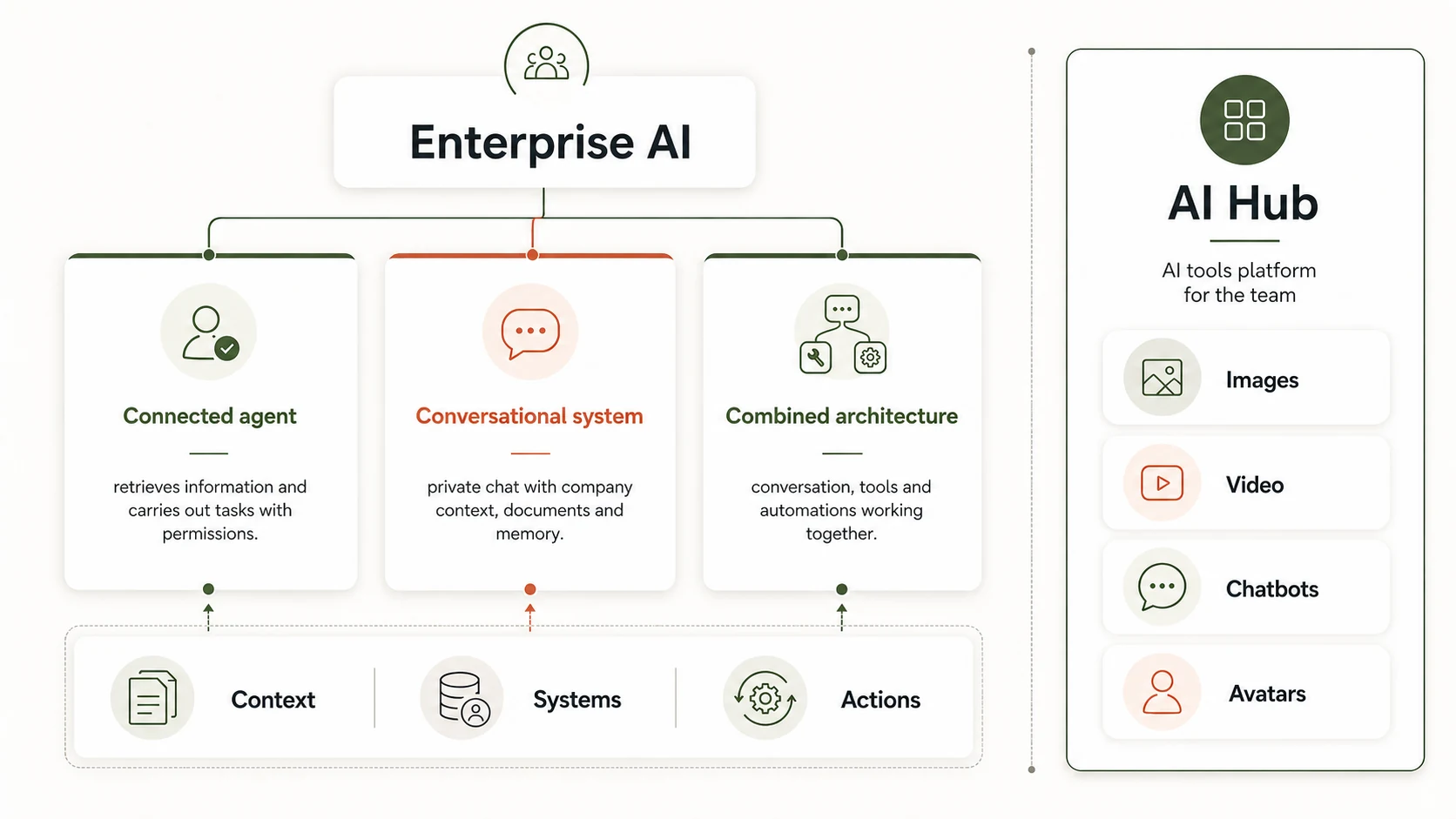
Enterprise AI is the application of artificial intelligence to a company’s internal operation: its systems, its data, its permissions and whichever actions are authorised. It is implemented with two approaches — a connected enterprise agent for concrete use cases, or a conversational operating system as a cross-cutting working layer — and also with a combined architecture of both. You start with a repetitive process that has written rules and a clear owner; not with “implementing AI in the company”.

The question almost always arrives the same way: “we want to use AI, where do we start?”. And it almost always comes after a trial with a generic assistant that answered well and was useless, because it knew nothing about the company and could do nothing inside it.

What changes the result isn’t the model but the architecture: which systems it connects to, which data it sees, what it can do with them and who authorises it. This article explains the two approaches we work with, when each one fits and what you need in place before starting.

What is Enterprise AI, and which two approaches exist?

Enterprise AI isn’t a product: it is an architecture that connects models to the systems where the work already lives. The connected enterprise agent resolves one or several defined use cases: it queries information, works with documents, uses tools and executes authorised actions. The conversational operating system goes beyond the use case: it is a cross-cutting working layer from which a team queries, writes, analyses and launches tasks across several systems at once.

There is also a combined architecture: the cross-cutting layer for daily work, with specialised agents underneath for the critical processes. It is the most common place to end up when the project grows well.

What it’s for
Connected agent Resolving one or several defined use cases end to end.
Operating system Being the daily working layer for an area or for the whole organisation.
Data scope
Connected agent The systems and documents of the use case, with minimisation rules.
Operating system Several connected sources, with permissions by area and by role.
Actions
Connected agent Executes that process’s authorised actions, with logging.
Operating system Launches tasks across several systems and hands off to specialised agents.
When it fits
Connected agent There is a clear, measurable process with an identified owner.
Operating system The problem isn’t a process: it is the scattering of tools and context.
Left column: connected enterprise agent. Right column: conversational operating system.

When does each approach fit?

The choice depends on what needs solving, not on the size of the company. Four frequent situations:

1
A clear, repetitive process → connected agent
Quotes, onboarding, reconciliations, handling internal orders: cases with writable rules and a measurable result.
2
Work scattered across many tools → conversational operating system
When time is lost searching for information and switching applications, not executing a concrete process.
3
Both at once → combined architecture
The cross-cutting layer for daily work, with specialised agents underneath for the critical processes.
4
Neither one yet
If the process’s data doesn’t exist in a system, or nobody answers for the outcome, the first project is to sort that out.
No AI architecture fixes a process nobody can explain. If it can’t be written on one page, it can’t be automated either.
An internal working principle, applied before connecting any system.

What needs defining before starting?

Four decisions, and none of them is about the model. They are taken before connecting anything:

  1. Systems. What it connects to: CRM, ERP, invoicing, inventory, calendar, document repositories. Every integration has its own cost and its own risk.
  2. Data. Which information falls within scope and which stays out. Not “all the data”: the use case’s data, with minimisation rules where sensitive information is involved.
  3. Permissions. Who can query what, by area and by role. The control is implemented technically, not with an instruction written inside a prompt.
  4. Actions. What it can execute on its own, what requires human confirmation and how it is logged. The list starts short and grows with evidence of use.

With that defined, the implementation is progressive: one use case connected and working, real measurement, and only then the next. It is slower to announce and far faster to finish.

What usually goes wrong?

Three failures repeat, and none of them is the model’s:

Starting with the most visible process instead of the clearest
Customer support is usually the first thing proposed and the last worth automating: it has the most exceptions.
Connecting everything from day one
Four systems at once multiply the points of failure. One well-connected system teaches you more than four half-done.
Not defining what needs human confirmation
A system that can issue invoices without review isn’t a saving: it is a risk with a friendly interface.
Choosing the approach before understanding the problem
An agent where a cross-cutting layer was needed — or the reverse — shows up in month two, when usage drops and nobody knows why.

How does it differ from AI Hub and from chatbots?

They are three different things and often get confused. The difference lies in who operates and what it acts on:

AI Hub

A platform of AI tools the client’s own team uses to create content, images, video, automations and agents. It is self-service: it doesn’t integrate with the company’s internal systems and doesn’t execute actions inside them.

Chatbots and conversational agents

Conversation with customers on web, messaging or phone: serving, qualifying and routing. It looks outward. Enterprise AI looks inward: the operation, the data and the authorised actions inside the company’s systems.

What to do next

Four questions for your next team meeting

Is the problem a concrete process, or the scattering of daily work?
Which systems would we need to connect to, and who authorises that access?
Which data stays out of scope for sensitivity reasons?
Which actions could run on their own, and which need confirmation?
See the Enterprise AI service Or send us the answers and we’ll tell you whether there is a project or not.
Sources and assumptions
· Own experience across the studio’s enterprise AI projects.· Public documentation of the integration platforms we use.· Savings figures: not included, because they depend on the process and the team.
Use of AI, and history
Draft ordered with a model’s help; research, examples and final review, human. Signed: the TouringXX editorial team, with the people who worked on the projects cited.

History:v1.1 — the point on write permissions was corrected, having been poorly explained.

If this helped, carry on here

All articles →
Automation

Five processes worth automating first

The ones that repeat, have clear rules and today consume somebody’s hours.

4 min · Jun 2026
SEO and GEO

How to get cited in AI search

What a model looks at when it chooses who to cite, and why structure weighs more than length.

5 min · May 2026
WordPress

WooCommerce checkout errors and how to avoid them

The points where a store loses purchases it had already won.

7 min · May 2026

Have the process, but not the certainty that it is worth it?

Tell us in two paragraphs. We’ll say whether we see it as viable, which approach to start with, and when the conclusion is that it isn’t needed yet.

Request an assessment WhatsApp